mwtoolbox package
Submodules
mwtoolbox.components module
This module involves the calculations related to RF/Microwave components.
- mwtoolbox.components.absorptive_filter_equalizer(arg, defaultunits=None)
Equalizer using an absorptive filter composed of two coupled lines.
- Parameters:
arg (list) –
First 4 arguments are inputs.
Reference Impedance ; impedance
Coupling (dB) ;
Center Frequency ; frequency
Test Frequency ; frequency
S21 (dB) ;
Zeven ; impedance
Zodd ; impedance
defaultunits (list, optional) – Default units for quantities in arg list. Default is [] which means SI units will be used if no unit is given in arg.
- Returns:
arg
- Return type:
list
- mwtoolbox.components.awg2dia(arg, defaultunits=None)
Convert AWG to Diameter. Reference: Wikipedia, Current rating is calculated through curve fit from online data.
- Parameters:
arg (list) –
First 1 arguments are inputs.
AWG ;
Diameter ;length
Current rating in still air ; current
defaultunits (list, optional) – Default units for quantities in arg list. Default is [] which means SI units will be used if no unit is given in arg.
- Returns:
arg
- Return type:
list
- mwtoolbox.components.binomial_quarter_wave_impedance_transformer(arg, defaultunits=None)
- Binomial Quarter Wave Impedance Transformer.
Reference: Impedance Matching and Transformation.pdf
- Parameters:
arg (list) –
First 5 arguments are inputs.
Source Impedance;impedance
Load Impedance;impedance
Number Of Matching Sections;
Max(dB(S<sub>11</sub>)) In Frequency Band ;
Center Frequency ; frequency
Impedances ; impedance
Bandwidth ; frequency
defaultunits (list, optional) – Default units for quantities in arg list. Default is [] which means SI units will be used if no unit is given in arg.
- Returns:
arg
- Return type:
list
- mwtoolbox.components.bridged_tee_attenuator_analysis(arg, defaultunits=None)
Bridged Tee Attenuator Analysis.
- Parameters:
arg (list) –
First 3 arguments are inputs.
Reference Impedance (Zo); impedance
Series Impedance (Rs); impedance
Parallel Impedance (Rp); impedance
S(1,1) ;
S(2,1) ;
defaultunits (list, optional) – Default units for quantities in arg list. Default is [] which means SI units will be used if no unit is given in arg.
- Returns:
arg
- Return type:
list
- mwtoolbox.components.bridged_tee_attenuator_synthesis(arg, defaultunits=None)
Bridged Tee Attenuator Synthesis.
- Parameters:
arg (list) –
First 3 arguments are inputs.
Reference Impedance (Zo); impedance
Series Impedance (Rs); impedance
Parallel Impedance (Rp); impedance
S(1,1) ;
S(2,1) ;
defaultunits (list, optional) – Default units for quantities in arg list. Default is [] which means SI units will be used if no unit is given in arg.
- Returns:
arg
- Return type:
list
- mwtoolbox.components.chebyshev_quarter_wave_impedance_transformer(arg, defaultunits=None)
Chebyshev Quarter Wave Impedance Transformer. Reference: Impedance Matching and Transformation.pdf + eski kod
- Parameters:
arg (list) –
First 6 arguments are inputs.
Source Impedance ; impedance
Load Impedance ; impedance
Number Of Matching Sections ;
Minimum Frequency ; frequency
Maximum Frequency ; frequency
Test Frequency ; frequency
Impedances ; impedance
Return Loss at Test Frequency ;
defaultunits (list, optional) – Default units for quantities in arg list. Default is [] which means SI units will be used if no unit is given in arg.
- Returns:
arg
- Return type:
list
- mwtoolbox.components.chebyshev_taper_impedance_transformer(arg, defaultunits=None)
Calculates performance and impedance values for an N-section Chebyshev Impedance Taper. Reference: Foundations for Microwave Engineering, Collin
- Parameters:
arg (list) –
First 5 arguments are inputs.
Source Impedance ; impedance
Load Impedance ; impedance
Number Of Sections (Even) ;
Fractional Bandwidth (F2/F1) ;
Length (normalized to Lambda at fcenter) ;
Impedances ; impedance
Return Loss ;
defaultunits (list, optional) – Default units for quantities in arg list. Default is [] which means SI units will be used if no unit is given in arg.
- Returns:
arg
- Return type:
list
- mwtoolbox.components.circular_plate_cap(arg, defaultunits=None)
Circular Plate Capacitance.
- Parameters:
arg (list) –
First 3 arguments are inputs.
Radius;length
Height;length
Dielectric Permittivity;
Frequency; frequency
Capacitance; capacitance
Impedance; impedance
defaultunits (list, optional) – Default units for quantities in arg list. Default is [] which means SI units will be used if no unit is given in arg.
- Returns:
arg
- Return type:
list
- mwtoolbox.components.dia2awg(arg, defaultunits=None)
Convert Diameter to AWG. Reference: Wikipedia
- Parameters:
arg (list) –
First 1 arguments are inputs.
AWG ;
Diameter ;length
Current rating in still air ; current
defaultunits (list, optional) – Default units for quantities in arg list. Default is [] which means SI units will be used if no unit is given in arg.
- Returns:
arg
- Return type:
list
- mwtoolbox.components.dual_frequency_transformer(arg, defaultunits=None)
Dual Frequency Transformer. Reference: A Small Dual Frequency Transformer in Two Sections
- Parameters:
arg (list) –
First 4 arguments are inputs.
Source Impedance; impedance
Load Impedance; impedance
f1 Lower Frequency; frequency
f2 Higher Frequency; frequency
Z1; impedance
Z2; impedance
Electrical Length ; angle
defaultunits (list, optional) – Default units for quantities in arg list. Default is [] which means SI units will be used if no unit is given in arg.
- Returns:
arg
- Return type:
list
- mwtoolbox.components.dual_transformation1(arg, defaultunits=None)
Dual Transformation 1. Reference: Microstrip Filters for RF-Microwave Applications, s.25, Figure 2.6a
- Parameters:
arg (list) –
First 4 arguments are inputs.
L1 ; inductance
C1 ; capacitance
L2 ; inductance
C2 ; capacitance
L1’ ; inductance
C1’ ; capacitance
L2’ ; inductance
C2’ ; capacitance
defaultunits (list, optional) – Default units for quantities in arg list. Default is [] which means SI units will be used if no unit is given in arg.
- Returns:
arg
- Return type:
list
- mwtoolbox.components.dual_transformation2(arg, defaultunits=None)
Dual Transformation 1. Reference: Microstrip Filters for RF-Microwave Applications, s.25, Figure 2.6b
- Parameters:
arg (list) –
First 4 arguments are inputs.
L1 ; inductance
C1 ; capacitance
L2 ; inductance
C2 ; capacitance
L1’ ; inductance
C1’ ; capacitance
L2’ ; inductance
C2’ ; capacitance
defaultunits (list, optional) – Default units for quantities in arg list. Default is [] which means SI units will be used if no unit is given in arg.
- Returns:
arg
- Return type:
list
- mwtoolbox.components.evanescent_wg_equivalent(arg, defaultunits=None)
Waveguide Width Step from Rectangular Waveguide to Evanescent Mode Rectangular Waveguide. Reference: The Design of Evanescent Mode Waveguide Bandpass Filters for a Prescribed Insertion Loss Characteristic.pdf Model= Xp1,Xs1,Xp1 ya da Xs2,Xp2,Xs2 (p: shunt, s: series) Zo=jXo
- Parameters:
arg (list) –
First 5 arguments are inputs.
Waveguide Width;length
Waveguide Height;length
Dielectric Permittivity;
Waveguide Length;length
Frequency; frequency
Series Inductance For Shunt-Series-Shunt Model; inductance
Shunt Inductance For Shunt-Series-Shunt Model; inductance
Series Inductance For Series-Shunt-Series Model; inductance
Shunt Inductance For Series-Shunt-Series Model; inductance
Characteristic Impedance; impedance
defaultunits (list, optional) – Default units for quantities in arg list. Default is [] which means SI units will be used if no unit is given in arg.
- Returns:
arg
- Return type:
list
- mwtoolbox.components.ewg_abcd(a, b, er, length, frek)
- mwtoolbox.components.ewg_inv(a, b, er, length, frek)
- mwtoolbox.components.exponential_taper_impedance_transformer(arg, defaultunits=None)
Exponential Impedance Taper. Reference: Foundations for Microwave Engineering, Collin
- Parameters:
arg (list) –
First 5 arguments are inputs.
Source Impedance ; impedance
Load Impedance ; impedance
Number Of Sections ;
Fractional Bandwidth (F2/F1) ;
Length (normalized to Lambda at fcenter) ;
Impedances ; impedance
Return Loss ;
defaultunits (list, optional) – Default units for quantities in arg list. Default is [] which means SI units will be used if no unit is given in arg.
- Returns:
arg
- Return type:
list
- mwtoolbox.components.fcutoff_cwg(rad, eps_r=1, v=0, n=1, mode='TE')
Computes the cutoff frequency of circular waveguide.
- Parameters:
v (int) – Mode number of \(\phi\).
n (int) – Radial mode number.
eps_r (float) – Permittivity of filling material.
mode (str) – “TE” or “TM”.
rad (float) – Radius.
- Returns:
Cutoff frequency (Hz).
- Return type:
fc (float)
- mwtoolbox.components.gysel_power_divider(arg, defaultunits=None)
Triangle network to Star network transformation. Reference: Zo1: 1. port impedance Zo2: 2. port impedance Zo3: 3. port impedance R1: first isolation resistor (2.porta yakin) R2: second isolation resistor (3.porta yakin) ratio: P2/P3 power ratio Z1: impedance of transmission line between 1.port and 2.port Z2: impedance of transmission line between 1.port and 3.port Z3: impedance of transmission line between 2.port and isolation resistor Z4: impedance of transmission line between 3.port and isolation resistor
- Parameters:
arg (list) –
First 6 arguments are inputs.
Zo1; impedance
Zo2; impedance
Zo3; impedance
R1; impedance
R2; impedance
P2/P3 ratio;
Z1; impedance
Z2; impedance
Z3; impedance
Z4; impedance
defaultunits (list, optional) – Default units for quantities in arg list. Default is [] which means SI units will be used if no unit is given in arg.
- Returns:
arg
- Return type:
list
- mwtoolbox.components.homogeneous_rect_waveguide_parameters_te(arg, defaultunits=None)
Homogeneous Rectangular Waveguide Parameters. Reference: Marcuvitz Waveguide Handbook s.253
- Parameters:
arg (list) –
First 10 arguments are inputs.
Dielectric Permittivity in Waveguide;
Waveguide Width;length
Waveguide Height;length
Mode (0: Te, 1: Tm);
M;
N;
Tand Of Dielectric;
Electrical Conductivity Of Walls; electrical conductivity
Frequency; frequency
Physical Length;length
Cond Loss; loss per length
Diel Loss; loss per length
Cutoff Freq; frequency
Lambda_Guided;length
Impedance; impedance
Electrical Length; angle
Group Velocity;
Group Delay; time
defaultunits (list, optional) – Default units for quantities in arg list. Default is [] which means SI units will be used if no unit is given in arg.
- Returns:
arg
- Return type:
list
- mwtoolbox.components.ind_air_core_coil(arg, defaultunits=None)
Inductance of a via hole in microstrip. Reference: www.microwavecoil.com , Microwave Components Inc.
- Parameters:
arg (list) –
First 4 arguments are inputs.
Wire Diameter (d) ;length
Coil Inner Diameter (d_in) ;length
Spacing Between Turns (s) ; length
Number Of Turns ;
Inductance ; inductance
Resonance Frequency ; frequency
defaultunits (list, optional) – Default units for quantities in arg list. Default is [] which means SI units will be used if no unit is given in arg.
- Returns:
arg
- Return type:
list
- mwtoolbox.components.ind_bond_wire(arg, defaultunits=None)
Inductance of a bond wire. Reference: Transmission Line Design Handbook, Wadell, s.153
- Parameters:
arg (list) –
First 4 arguments are inputs.
Bondwire Radius ;length
Substrate Thickness ;length
Distance Between End Points ;length
Angle At End Points In Degrees ; angle
Inductance ;inductance
defaultunits (list, optional) – Default units for quantities in arg list. Default is [] which means SI units will be used if no unit is given in arg.
- Returns:
arg
- Return type:
list
- mwtoolbox.components.ind_microstrip_via_hole(arg, defaultunits=None)
Inductance of a via hole in microstrip. Reference: Microstrip Via Hole Grounds in Microstrip.pdf
- Parameters:
arg (list) –
First 2 arguments are inputs.
Via Radius ;length
Substrate Thickness ;length
Inductance ; inductance
defaultunits (list, optional) – Default units for quantities in arg list. Default is [] which means SI units will be used if no unit is given in arg.
- Returns:
arg
- Return type:
list
- mwtoolbox.components.ind_straight_flat_wire(arg, defaultunits=None)
Inductance of a flat wire. Reference: Transmission Line Design Handbook, Wadell, s.382
- Parameters:
arg (list) –
First 6 arguments are inputs.
Wire Width ;length
Wire Thickness ;length
Wire Length ;length
Frequency ; frequency
Relative Permeability ;
Conductivity ; electrical conductivity
Inductance ;inductance
Impedance ;impedance
defaultunits (list, optional) – Default units for quantities in arg list. Default is [] which means SI units will be used if no unit is given in arg.
- Returns:
arg
- Return type:
list
- mwtoolbox.components.ind_straight_round_wire(arg, defaultunits=None)
Inductance of a straight round wire. Reference: Transmission Line Design Handbook, Wadell, s.380
- Parameters:
arg (list) –
First 5 arguments are inputs.
Wire Diameter ;length
Wire Length ;length
Frequency ; frequency
Dielectric Permeability ;
Conductivity ; electrical conductivity
Inductance ;inductance
Impedance ; impedance
defaultunits (list, optional) – Default units for quantities in arg list. Default is [] which means SI units will be used if no unit is given in arg.
- Returns:
arg
- Return type:
list
- mwtoolbox.components.inductive_post_in_waveguide(arg, defaultunits=None)
Inductive Post In Waveguide. Reference: Marcuvitz Waveguide Handbook s.257
- Parameters:
arg (list) –
First 6 arguments are inputs.
Dielectric Permittivity in Waveguide ;
Waveguide Width (a);length
Waveguide Height (b);length
Post Diameter (d);length
Waveguide Sidewall To Post Center (s);length
Frequency; frequency
Inductance;inductance
Capacitance; capacitance
Impedance; impedance
defaultunits (list, optional) – Default units for quantities in arg list. Default is [] which means SI units will be used if no unit is given in arg.
- Returns:
arg
- Return type:
list
- mwtoolbox.components.inductive_window_in_waveguide(arg, defaultunits=None)
Waveguide Width Step from Rectangular Waveguide to Evanescent Mode Rectangular Waveguide. Reference: Marcuvitz Waveguide Handbook s.253
- Parameters:
arg (list) –
First 6 arguments are inputs.
Dielectric Permittivity in Waveguide ;
Waveguide Width (a);length
Waveguide Height (b);length
Difference Of Waveguide Width To Window Width;length
Window Thickness;length
Frequency; frequency
Inductance;inductance
Capacitance; capacitance
Impedance; impedance
defaultunits (list, optional) – Default units for quantities in arg list. Default is [] which means SI units will be used if no unit is given in arg.
- Returns:
arg
- Return type:
list
- mwtoolbox.components.interference_phase_amp_error(arg, defaultunits=None)
Maximum phase and amplitude variation of a signal in presence of an interfering signal.
- Parameters:
arg (list) –
First 1 arguments are inputs.
Difference in dB ;
Amplitude Error;
Phase Error; angle
defaultunits (list, optional) – Default units for quantities in arg list. Default is [] which means SI units will be used if no unit is given in arg.
- Returns:
arg
- Return type:
list
- mwtoolbox.components.klopfenstein_taper_impedance_transformer(arg, defaultunits=None)
Calculates performance and impedance values for an N-section Klopfenstein Impedance Taper. Reference: Microwave Engineering, Pozar
- Parameters:
arg (list) –
First 6 arguments are inputs.
Source Impedance ; impedance
Load Impedance ; impedance
Maximum Reflection Coefficient (dB) ;
Number Of Sections ;
Minimum Frequency ; frequency
Test Frequency ; frequency
Minimum Total Phase at Minimum Frequency ; angle ;
Impedances ; impedance
MAG(Reflection Coefficient) ;
defaultunits (list, optional) – Default units for quantities in arg list. Default is [] which means SI units will be used if no unit is given in arg.
- Returns:
arg
- Return type:
list
- mwtoolbox.components.lc_balun(arg, defaultunits=None)
Calculate LC Balun.
- Parameters:
arg (list) –
First 4 arguments are inputs.
Source Impedance (Rin) ; impedance
Load Impedances (RL) ; impedance
Frequency; frequency
Test Frequency ; frequency
Inductance ; inductance
Capacitance ; capacitance
S11 (dB) ;
S21 (dB) ;
S31 (dB) ;
defaultunits (list, optional) – Default units for quantities in arg list. Default is [] which means SI units will be used if no unit is given in arg.
- Returns:
arg
- Return type:
list
- mwtoolbox.components.optimum_mitered_90_deg_microstrip_bend(arg, defaultunits=None)
Optimum Mitered Microstrip Bend Parameters. Reference: Tranmission line design handbook, p.290
- Parameters:
arg (list) –
First 2 arguments are inputs.
Microstrip Width;length
Substrate Height;length
Miter Length; length
defaultunits (list, optional) – Default units for quantities in arg list. Default is [] which means SI units will be used if no unit is given in arg.
- Returns:
arg
- Return type:
list
- mwtoolbox.components.optimum_mitered_arbitrary_angle_microstrip_bend(arg, defaultunits=None)
Optimum Mitered Microstrip Bend Parameters. Reference: MWOHELP, MBENDA model Burada scipy.interpolate.griddata kullanildi ve maalesef extrapolation yapmiyor. Sinir disi degerlerde dogrudan en yakin deger kullanildi.
- Parameters:
arg (list) –
First 2 arguments are inputs.
Microstrip Width;length;
Substrate Height;length;
Angle (0-180 degrees); angle ;
Miter Length; length ;
defaultunits (list, optional) – Default units for quantities in arg list. Default is [] which means SI units will be used if no unit is given in arg.
- Returns:
arg
- Return type:
list
- mwtoolbox.components.parallel_plate_cap(arg, defaultunits=None)
Parallel Plate Capacitance.
- Parameters:
arg (list) –
First 4 arguments are inputs.
Width;length
Length;length
Height;length
Dielectric Permittivity;
Frequency; frequency
Capacitance; capacitance
Impedance; impedance
defaultunits (list, optional) – Default units for quantities in arg list. Default is [] which means SI units will be used if no unit is given in arg.
- Returns:
arg
- Return type:
list
- mwtoolbox.components.patch_antenna_analysis(arg, defaultunits=None)
Calculates performance and impedance values for an N-section Chebyshev Impedance Taper. Ref: Overview of Microstrip Antennas (Jackson) (Presentation) Reference: Foundations for Microwave Engineering, Collin
- Parameters:
arg (list) –
First 6 arguments are inputs.
Width (W) ; length
Length (L) ; length
Substrate Thickness (h);length
Dielectric Permittivity ;
Dielectric Loss Tangent ;
Metal Conductivity ; electrical conductivity
Resonance Frequency (f) ; frequency
Bandwidth ; frequency
defaultunits (list, optional) – Default units for quantities in arg list. Default is [] which means SI units will be used if no unit is given in arg.
- Returns:
arg
- Return type:
list
- mwtoolbox.components.pcb_track_current_capacity(arg, defaultunits=None)
PCB Track Current Capacity.
- Parameters:
arg (list) –
First 7 arguments are inputs.
Metal Width; length
PCB Height; length
Metal Thickness; length
Allowable Temperature Rise; temperature
Thermal Conductivity; thermal conductivity
Electrical Conductivity; electrical conductivity
External if 1, Internal if 0;
Current ; current
defaultunits (list, optional) – Default units for quantities in arg list. Default is [] which means SI units will be used if no unit is given in arg.
- Returns:
arg
- Return type:
list
- mwtoolbox.components.pcb_track_current_capacity_ipc(arg, defaultunits=None)
PCB Track Current Capacity, IPC. Reference: IPC2221A
- Parameters:
arg (list) –
First 4 arguments are inputs.
Metal Width;length
Metal Thickness;length
Allowable Temperature Rise; temperature
External if 1, Internal if 0;
Current ; current
defaultunits (list, optional) – Default units for quantities in arg list. Default is [] which means SI units will be used if no unit is given in arg.
- Returns:
arg
- Return type:
list
- mwtoolbox.components.pi_attenuator_analysis(arg, defaultunits=None)
Pi Attenuator Analysis.
- Parameters:
arg (list) –
First 3 arguments are inputs.
Reference Impedance (Zo); impedance
Series Impedance (Rs); impedance
Parallel Impedance (Rp); impedance
S(1,1) ;
S(2,1) ;
P1 ;
P2 ;
P3 ;
defaultunits (list, optional) – Default units for quantities in arg list. Default is [] which means SI units will be used if no unit is given in arg.
- Returns:
arg
- Return type:
list
- mwtoolbox.components.pi_attenuator_synthesis(arg, defaultunits=None)
Pi Attenuator Analysis.
- Parameters:
arg (list) –
First 3 arguments are inputs.
Reference Impedance (Zo); impedance
Series Impedance (Rs); impedance
Parallel Impedance (Rp); impedance
S(1,1) ;
S(2,1) ;
P1 ;
P2 ;
P3 ;
defaultunits (list, optional) – Default units for quantities in arg list. Default is [] which means SI units will be used if no unit is given in arg.
- Returns:
arg
- Return type:
list
- mwtoolbox.components.rect_wg_to_evanescent_rect_wg_step(a1, a2)
Waveguide Width Step from Rectangular Waveguide to Evanescent Mode Rectangular Waveguide. Reference: The Design of Evanescent Mode Waveguide Bandpass Filters for a Prescribed Insertion Loss Characteristic.pdf
- Parameters:
arg (list) –
First 2 arguments are inputs.
Width of Rectangular Waveguide;length;
Width of Evanescent Mode Rectangular Waveguide;length;
Inductance; inductance
Turns Ratio;
defaultunits (list, optional) – Default units for quantities in arg list. Default is [] which means SI units will be used if no unit is given in arg.
- Returns:
arg
- Return type:
list
- mwtoolbox.components.shorten_90_degree_line(arg, defaultunits=None)
Shortening 90 Degree Line with a capacitive load.
- Parameters:
arg (list) –
First 3 arguments are inputs.
Impedance (Zo); impedance
Center Frequency ; frequency
Electrical Length (theta) ; angle
Impedance (Z); impedance
Capacitance ; capacitance
defaultunits (list, optional) – Default units for quantities in arg list. Default is [] which means SI units will be used if no unit is given in arg.
- Returns:
arg
- Return type:
list
- mwtoolbox.components.siw_equivalent_width(w, d, s)
Equivalent width of substrate integrated waveguide.
- Parameters:
w (float) – Distance between the centers of two via arrays.
d (float) – Diameter of vias.
s (float) – Distance between the centers of consecutive vias of via arrays.
- Returns:
Equivalent width of waveguide.
- Return type:
float
- mwtoolbox.components.star_to_triangle_transformation(arg, defaultunits=None)
- Star network to Triangle network transformation.
Reference: At star, z1 is connected to A-node, z2 is connected to B-node, z3 is connected to C-node At triangle, z1 is between A-B, z2 is between A-C, z3 is between B-C
- Parameters:
arg (list) –
First 3 arguments are inputs.
Z1; impedance
Z2; impedance
Z3; impedance
Z1’; impedance
Z2’; impedance
Z3’; impedance
defaultunits (list, optional) – Default units for quantities in arg list. Default is [] which means SI units will be used if no unit is given in arg.
- Returns:
arg
- Return type:
list
- mwtoolbox.components.symmetric_lange_coupler(arg, defaultunits=None)
Symmetric Lange Coupler. Reference: Microwave Circuits, Analysis and Computer-Aided Design, Fusco
- Parameters:
arg (list) –
First 3 arguments are inputs.
C: Voltage coupling coefficient in dB (positive);
n: Number of fingers (should be even);
Reference Impedance;impedance
Zoo;impedance
Zoe;impedance
defaultunits (list, optional) – Default units for quantities in arg list. Default is [] which means SI units will be used if no unit is given in arg.
- Returns:
arg
- Return type:
list
- mwtoolbox.components.tee_attenuator_analysis(arg, defaultunits=None)
Tee Attenuator Analysis.
- Parameters:
arg (list) –
First 3 arguments are inputs.
Reference Impedance (Zo); impedance
Series Impedance (Rs); impedance
Parallel Impedance (Rp); impedance
S(1,1) ;
S(2,1) ;
P1 ;
P2 ;
P3 ;
defaultunits (list, optional) – Default units for quantities in arg list. Default is [] which means SI units will be used if no unit is given in arg.
- Returns:
arg
- Return type:
list
- mwtoolbox.components.tee_attenuator_synthesis(arg, defaultunits=None)
Tee Attenuator Synthesis.
- Parameters:
arg (list) –
First 5 arguments are inputs.
Reference Impedance (Zo); impedance
Series Impedance (Rs); impedance
Parallel Impedance (Rp); impedance
S(1,1) ;
S(2,1) ;
P1 ;
P2 ;
P3 ;
defaultunits (list, optional) – Default units for quantities in arg list. Default is [] which means SI units will be used if no unit is given in arg.
- Returns:
arg
- Return type:
list
- mwtoolbox.components.thermal_conductance_of_via_farm(arg, defaultunits)
Thermal conductance of an array of vias in PCB.
- Parameters:
arg (list) –
First 7 arguments are inputs.
Plated Via Diameter (d);length
Plating Thickness (t);length
Area Width (w);length
Area Height (l);length
Dielectric Height (h);length
Number Of Vias (n);
Dielectric Thermal Conductivity ; thermal conductivity
Metal Thermal Conductivity ; thermal conductivity
Thermal Conductance (W/K) ;
Thermal Resistance (K/W) ;
defaultunits (list, optional) – Default units for quantities in arg list. Default is [] which means SI units will be used if no unit is given in arg.
- Returns:
arg
- Return type:
list
- mwtoolbox.components.thermal_conductance_of_via_farm_view(arg, defaultunits)
- mwtoolbox.components.triangle_to_star_transformation(arg, defaultunits=None)
Triangle network to Star network transformation. At star, z1 is connected to A-node, z2 is connected to B-node, z3 is connected to C-node At triangle, z1’ is between A-B, z2’ is between A-C, z3’ is between B-C
- Parameters:
arg (list) –
Last 3 arguments are inputs.
Z1; impedance
Z2; impedance
Z3; impedance
Z1’; impedance
Z2’; impedance
Z3’; impedance
defaultunits (list, optional) – Default units for quantities in arg list. Default is [] which means SI units will be used if no unit is given in arg.
- Returns:
arg
- Return type:
list
- mwtoolbox.components.triangular_taper_impedance_transformer(arg, defaultunits=None)
Triangular Impedance Taper. Reference: Foundations for Microwave Engineering, Collin
- Parameters:
arg (list) –
First 5 arguments are inputs.
Source Impedance ; impedance
Load Impedance ; impedance
Number Of Sections (Even) ;
Fractional Bandwidth (F2/F1) ;
Length (normalized to Lambda at fcenter) ;
Impedances ; impedance
Return Loss ;
defaultunits (list, optional) – Default units for quantities in arg list. Default is [] which means SI units will be used if no unit is given in arg.
- Returns:
arg
- Return type:
list
- mwtoolbox.components.z_cwg(rad, freq, eps_r=1, v=0, n=1, mode='TE')
Computes the wave impedance of circular waveguide.
- Parameters:
v (int) – Mode number of \(\phi\).
n (int) – Radial mode number.
eps_r (float) – Permittivity of filling material.
freq (float) – Frequency (Hz).
mode (str) – “TE” or “TM”.
rad (float) – Radius.
- Returns:
Impedance.
- Return type:
Z (float)
- mwtoolbox.components.z_wg_te10(er, a, b, freq, formulation=1)
- mwtoolbox.components.zo_eeff_straight_wire_over_substrate(arg, defaultunits=None)
Impedance and Effective Permittivity of Straight Wire Over Substrate. Reference: Transmission Line Design Handbook, Wadell, s.151
- Parameters:
arg (list) –
First 4 arguments are inputs.
Wire Diameter (d);length
Height Of Wire Center Above Ground (h);length
Dielectric Thickness (t);length
Dielectric Permittivity ;
Impedance ; impedance
Effective Diel. Permittivity ;
defaultunits (list, optional) – Default units for quantities in arg list. Default is [] which means SI units will be used if no unit is given in arg.
- Returns:
arg
- Return type:
list
- mwtoolbox.components.zo_eeff_wire_on_grounded_substrate(arg, defaultunits=None)
- Impedance and Effective Permittivity of Straight Wire Over Substrate.
Reference: Transmission Line Design Handbook, Wadell, s.151 Note: eeff is the same as eeff of microstrip with w=2*d, t=0
- Parameters:
arg (list) –
First 4 arguments are inputs.
Wire Diameter (d);length
Dielectric Thickness (t);length
Dielectric Permittivity ;
Impedance ; impedance
Effective Diel. Permittivity ;
defaultunits (list, optional) – Default units for quantities in arg list. Default is [] which means SI units will be used if no unit is given in arg.
- Returns:
arg
- Return type:
list
mwtoolbox.filters module
- mwtoolbox.filters.bp_filter_from_prototype(g, Zo, fc, FBW, type=1)
- mwtoolbox.filters.bs_filter_from_prototype(g, Zo, fc, FBW, type=1)
- mwtoolbox.filters.butterworth_filter_prototype(n)
- mwtoolbox.filters.chebyshev_filter_prototype(n, Lar)
- mwtoolbox.filters.chebyshev_stepped_impedance_lp_filter(Zo, maxreturnloss, N, theta)
- mwtoolbox.filters.evanescent_wg_filter3(g, n, Lj, a, a1, b, er, fcenter, fbw, alpha)
- mwtoolbox.filters.evanescent_wg_filter4(g, n, Lj, a, a1, b, er, fcenter, fbw, alpha)
- mwtoolbox.filters.ewg_abcd(a, b, er, length, frek)
- mwtoolbox.filters.filter_with_j_inverter(g, Zo, fcenter, fbw, caps)
- mwtoolbox.filters.filter_with_j_inverter2(g, Zo, fcenter, fbw, caps)
- mwtoolbox.filters.hp_filter_from_prototype(g, Zo, fc, type=1)
- mwtoolbox.filters.inductive_post_wg_filter(er, a, b, maxreturnloss, N, d, x, f1, f2)
- mwtoolbox.filters.lp_filter_from_prototype(g, Zo, fc, type=1)
- mwtoolbox.filters.minimum_butterworth_filter_degree(L, fstop)
- mwtoolbox.filters.minimum_chebyshev_filter_degree(Lar, Las, fstop)
- mwtoolbox.filters.zwg_te10(er, a, b, freq)
mwtoolbox.genel module
General methods
- class mwtoolbox.genel.Flexlist(iterable=(), /)
Bases:
listThis is a list implementation that supports indexing by list to return some elements of the list
- mwtoolbox.genel.annotate_heatmap(im, data=None, valfmt='{x:.2f}', textcolors=('black', 'white'), threshold=None, **textkw)
A function to annotate a heatmap. https://matplotlib.org/3.5.0/gallery/images_contours_and_fields/image_annotated_heatmap.html
- Parameters:
im – The AxesImage to be labeled.
data – Data used to annotate. If None, the image’s data is used. Optional.
valfmt – The format of the annotations inside the heatmap. This should either use the string format method, e.g. “$ {x:.2f}”, or be a matplotlib.ticker.Formatter. Optional.
textcolors – A pair of colors. The first is used for values below a threshold, the second for those above. Optional.
threshold – Value in data units according to which the colors from textcolors are applied. If None (the default) uses the middle of the colormap as separation. Optional.
kwargs – All other arguments are forwarded to each call to text used to create the text labels.
- Usage:
fig, ax = plt.subplots() im, cbar = heatmap(harvest, vegetables, farmers, ax=ax, cmap=”YlGn”, cbarlabel=”harvest [t/year]”) texts = annotate_heatmap(im, valfmt=”{x:.1f} t”)
- mwtoolbox.genel.blackman_window(N)
Blackman-Harris window Also available in scipy.signal
- mwtoolbox.genel.cmp(x, y)
Replacement for built-in function cmp that was removed in Python 3
Compare the two objects x and y and return an integer according to the outcome. The return value is negative if x < y, zero if x == y and strictly positive if x > y.
- mwtoolbox.genel.coef(birim)
SI’dan Birim’e cevirmek icin katsayi
- mwtoolbox.genel.convert2pq(sayilar, defaultunits=None)
Method to convert a string or string list to float after unit conversion to SI Units are extracted from strings. If there is not a unit in string, unit is taken from defaultunits
- mwtoolbox.genel.convert_image(filename, format)
- mwtoolbox.genel.do_cprofile(func)
- mwtoolbox.genel.do_profile(follow=[])
Helpful if you accidentally leave in production!
- class mwtoolbox.genel.dotdict
Bases:
dictdot.notation access to dictionary attributes This class is not pickleable!!! objdict is pickleable, because it raises correct exceptions, dill instead of pickle does not work too.
- mwtoolbox.genel.ekpolyfit(x)
Polynomial fit for ellipk function. works from 0 to 0.98 with good accuracy.
- mwtoolbox.genel.flatten(x)
Flatten (an irregular) list of lists
- mwtoolbox.genel.flatten2(l)
Flatten (an irregular) list of lists (yield version of flatten)
- mwtoolbox.genel.gaussian_window(sigma, N)
Gaussian window sigma should be smaller than or equal to 0.5 Also available in scipy.signal Ref: Wikipedia
- mwtoolbox.genel.heatmap(data, row_labels, col_labels, ax=None, cbar_kw={}, cbarlabel='', **kwargs)
Create a heatmap from a numpy array and two lists of labels. https://matplotlib.org/3.5.0/gallery/images_contours_and_fields/image_annotated_heatmap.html
- Parameters:
data – A 2D numpy array of shape (M, N).
row_labels – A list or array of length M with the labels for the rows.
col_labels – A list or array of length N with the labels for the columns.
ax – A matplotlib.axes.Axes instance to which the heatmap is plotted. If not provided, use current axes or create a new one. Optional.
cbar_kw – A dictionary with arguments to matplotlib.Figure.colorbar. Optional.
cbarlabel – The label for the colorbar. Optional.
kwargs – All other arguments are forwarded to imshow.
- Usage:
fig, ax = plt.subplots() im, cbar = heatmap(harvest, vegetables, farmers, ax=ax, cmap=”YlGn”, cbarlabel=”harvest [t/year]”) texts = annotate_heatmap(im, valfmt=”{x:.1f} t”)
- class mwtoolbox.genel.objdict
Bases:
dict
- class mwtoolbox.genel.objectview(d)
Bases:
object
- mwtoolbox.genel.peakdet(v, delta, x=None)
Converted from MATLAB script at http://billauer.co.il/peakdet.html
Returns two arrays
function [maxtab, mintab]=peakdet(v, delta, x) %PEAKDET Detect peaks in a vector % [MAXTAB, MINTAB] = PEAKDET(V, DELTA) finds the local % maxima and minima (“peaks”) in the vector V. % MAXTAB and MINTAB consists of two columns. Column 1 % contains indices in V, and column 2 the found values. % % With [MAXTAB, MINTAB] = PEAKDET(V, DELTA, X) the indices % in MAXTAB and MINTAB are replaced with the corresponding % X-values. % % A point is considered a maximum peak if it has the maximal % value, and was preceded (to the left) by a value lower by % DELTA.
% Eli Billauer, 3.4.05 (Explicitly not copyrighted). % This function is released to the public domain; Any use is allowed.
- mwtoolbox.genel.polarsample(x)
Samples the Smith Chart uniformly and returns the reflection coefficient values :param x: Approximate distance between the points. :type x: float
- Returns:
list of reflection coefficient values in complex form
- Return type:
list
- mwtoolbox.genel.prettystring(miktarlar, birim=None)
- mwtoolbox.genel.printall(isimler, args)
- mwtoolbox.genel.smooth(x, window_len=11, window='hanning')
smooth the data using a window with requested size. This method is based on the convolution of a scaled window with the signal. The signal is prepared by introducing reflected copies of the signal (with the window size) in both ends so that transient parts are minimized in the begining and end part of the output signal.
- Parameters:
x (ndarray) – the input signal
window_len (int, optional) – the dimension of the smoothing window; should be an odd integer
window ((string, list, ndarray), optional) –
- either
window array with type list or numpy array with size window_len
- or
the type of window from ‘flat’, ‘hanning’, ‘hamming’, ‘bartlett’, ‘blackman’
- Returns:
the smoothed signal
Example
t=linspace(-2,2,0.1) x=sin(t)+randn(len(t))*0.1 y=smooth(x) see also: numpy.hanning, numpy.hamming, numpy.bartlett, numpy.blackman, numpy.convolve scipy.signal.lfilter
- mwtoolbox.genel.split_camel_case(str)
Split string written with CamelCase to words. The first letter can be either lower or upper case.
- mwtoolbox.genel.str_distance(s, t)
levenshtein_ratio_and_distance: Calculates levenshtein distance between two strings. If ratio_calc = True, the function computes the levenshtein distance ratio of similarity between two strings For all i and j, distance[i,j] will contain the Levenshtein distance between the first i characters of s and the first j characters of t
- mwtoolbox.genel.stripunit(sayi)
- mwtoolbox.genel.tukey_window(alpha, N)
Tukey window (also known as “tapered cosine window”) Also available in scipy.signal
mwtoolbox.myconstants module
mwtoolbox.network module
Network Parameters
- mwtoolbox.network.abcd2s(M, Zo=50.0)
ABCD parameters to S - Parameters conversion. Valid for real Zo value.
- mwtoolbox.network.abcd2s_list(M, Zo=50.0)
ABCD parameters to S - Parameters conversion. Valid for real Zo value.
- mwtoolbox.network.abcd2t(M, Zo=50.0)
ABCD parameters to T-Parameters conversion. Valid for real impedances.
ABCD: [V1 I1]=ABCD*[V2 -I2] Pseudo-Wave or Power-Wave? Don’t use for complex impedances.
- mwtoolbox.network.abcd2y(M)
ABCD parameters to Y-Parameters conversion
- mwtoolbox.network.abcd2z(M)
ABCD parameters to Z - Parameters conversion
- mwtoolbox.network.abcd_change_ports(M)
Switching ports of ABCD parameters
- mwtoolbox.network.cascade_networks(networks)
Cascading 2-port Networks, input and output is ABCD matrices of networks
- mwtoolbox.network.circulator()
S-parameters of an ideal circulator (circulation direction 1⇒2⇒3)
- mwtoolbox.network.connect_2_ports(Smatrix, k, m)
Port-m is connected to port-k and both ports are removed Reference: QUCS technical.pdf, S-parameters in CAE programs, p.29
- mwtoolbox.network.connect_2_ports_list(Smatrix, conns)
Short circuit ports together one-to-one. Short circuited ports are removed. Ports that will be connected are given as tuples in list conn i.e. conn=[(p1,p2),(p3,p4),..] The order of remaining ports is kept. Reference: QUCS technical.pdf, S-parameters in CAE programs, p.29
- mwtoolbox.network.connect_2_ports_retain(Smatrix, k, m)
Port-m and Port-k are joined to a single port. New port becomes the last port of the circuit. Reference: QUCS technical.pdf, S-parameters in CAE programs, p.29
- mwtoolbox.network.connect_network_1_conn(Smatrix, EX, k, m)
Port-m of EX circuit is connected to port-k of this circuit Remaining ports of EX are added to the port list of this circuit in order. Reference: QUCS technical.pdf, S-parameters in CAE programs, p.29
- mwtoolbox.network.connect_network_1_conn_retain(Smatrix, EX, k, m)
- mwtoolbox.network.ideal_amp(G)
S-parameters of an ideal amplifier/isolator G is voltage gain, no reflection, infinite isolation
- mwtoolbox.network.ideal_att(G)
S-parameters of an ideal attenuator G is voltage gain (<1), no reflection
- mwtoolbox.network.ideal_coupled_line(Ze, Zo, Te, To, Z0)
S-parameters of ideal coupled line Te and To in radian 3———-4 1———-2
- mwtoolbox.network.ideal_gyrator()
S-parameters of ideal gyrator
- mwtoolbox.network.ideal_nport(N)
S-parameters of ideal N-port junction with equal reference impedances at all ports
- mwtoolbox.network.jinv(J)
ABCD parameters of J - inverter
- mwtoolbox.network.jinv_lumped(X)
ABCD parameters of J - inverter produced by 3 inductors in Tee form.
- mwtoolbox.network.kinv(K)
ABCD parameters of k - inverter
- mwtoolbox.network.parallel_networks(networks)
Paralleling 2-port Networks, input and output is ABCD matrices of networks
- mwtoolbox.network.pi_network(Zp1, Zs, Zp2)
ABCD parameters of Pi network
- mwtoolbox.network.s2abcd(M, Z=(50.0, 50.0))
S-Parameters to ABCD parameters conversion. Valid for real Zo value.
- Parameters:
Z (2-tuple, optional) – reference impedance tuple ( Z1, Z2 )
- mwtoolbox.network.s2t(M)
S-Parameters to Transfer scattering parameters conversion According to definition [b1,a1]=T.[a2,b2] Ref: https://en.wikipedia.org/wiki/Scattering_parameters#Scattering_transfer_parameters
- mwtoolbox.network.s2t_list(M)
S-Parameters to Transfer scattering parameters conversion According to definition [b1,a1]=T.[a2,b2] Ref: https://en.wikipedia.org/wiki/Scattering_parameters#Scattering_transfer_parameters
- mwtoolbox.network.s_normalize_power(S, Zold, Znew)
Zold, Znew port_sayisi uzunlugunda dizilerdir Power-Wave icin Reference: Article, “Multiport conversions between S, Z, Y, h, ABCD, and T parameters”
- mwtoolbox.network.s_normalize_pseudo(S, Zold, Znew)
Zold, Znew port_sayisi uzunlugunda dizilerdir Pseudo-Wave icin
- mwtoolbox.network.s_phase_deembed(S, phase)
S-parameter deembedding S is numpy.matrix NxN phase, deembedding phase for each port in radian. Positive phase is deembedding into the circuit
- mwtoolbox.network.series_networks(networks)
Series Connection of Networks (reference pins of 1. network is connected to alive pins of 2. network), input and output is ABCD matrices of networks
- mwtoolbox.network.series_z(Z)
ABCD parameters of series impedance
- mwtoolbox.network.shunt_z(Z)
ABCD parameters of shunt impedance
- mwtoolbox.network.snp2smp(SM, ports)
This method changes the port numbering of the network port j of new network corresponds to ports[j] in old network if the length of “ports” argument is lower than number of ports, remaining ports are terminated with current reference impedances and number of ports are reduced.
- mwtoolbox.network.t2abcd(M, Z=(50.0, 50.0))
T-parameters to ABCD parameters conversion
- mwtoolbox.network.t2s(M)
Transfer scattering parameters to S-Parameters conversion According to definition [b1,a1]=T.[a2,b2] Ref: https://en.wikipedia.org/wiki/Scattering_parameters#Scattering_transfer_parameters
- mwtoolbox.network.t2s_list(M)
Transfer scattering parameters to S-Parameters conversion According to definition [b1,a1]=T.[a2,b2] Ref: https://en.wikipedia.org/wiki/Scattering_parameters#Scattering_transfer_parameters
- mwtoolbox.network.t_network(Zs1, Zp, Zs2)
ABCD parameters of Tee network
- mwtoolbox.network.tline(Zo, theta)
ABCD parameters of ideal transmission line, theta = radian
- mwtoolbox.network.tline_list(Zo, theta)
ABCD parameters of ideal transmission line, theta = radian
- mwtoolbox.network.tline_lossy(Zo, gamma)
ABCD parameters of lossy transmission line, gamma = complex propagation constant
- mwtoolbox.network.transformer(N)
ABCD parameters of ideal transformer (1:N)
- mwtoolbox.network.y2abcd(M)
Y-Parameters to ABCD parameters conversion
- mwtoolbox.network.z2abcd(M)
Z - Parameters to ABCD parameters conversion
mwtoolbox.networksym module
Network Parameters
- mwtoolbox.networksym.abcd2s(M, Zo=50)
ABCD parameters to S - Parameters conversion Valid for real Zo value
- mwtoolbox.networksym.abcd2s_list(M, Zo=50)
ABCD parameters to S - Parameters conversion Valid for real Zo value
- mwtoolbox.networksym.abcd2t(M, Zo=50)
ABCD parameters to T - Parameters conversion
ABCD: [V1 I1]=ABCD*[V2 -I2] Pseudo-Wave or Power-Wave? Don’t use.
- mwtoolbox.networksym.abcd2y(M)
ABCD parameters to Y - Parameters conversion
- mwtoolbox.networksym.abcd2z(M)
ABCD parameters to Z - Parameters conversion
- mwtoolbox.networksym.abcd_change_ports(M)
Switching ports of ABCD parameters
- mwtoolbox.networksym.cascade_networks(networks)
Cascading 2-port Networks, input and output is ABCD matrices of networks
- mwtoolbox.networksym.circulator()
S-parameters of an ideal circulator (circulation direction 1⇒2⇒3)
- mwtoolbox.networksym.connect_2_ports(Smatrix, k, m)
Port-m is connected to port-k and both ports are removed Reference: QUCS technical.pdf, S-parameters in CAE programs, p.29
- mwtoolbox.networksym.connect_2_ports_list(Smatrix, conns)
Short circuit ports together one-to-one. Short circuited ports are removed. Ports that will be connected are given as tuples in list conn i.e. conn=[(p1,p2),(p3,p4),..] The order of remaining ports is kept. Reference: QUCS technical.pdf, S-parameters in CAE programs, p.29
- mwtoolbox.networksym.connect_2_ports_retain(Smatrix, k, m)
Port-m and Port-k are joined to a single port. New port becomes the last port of the circuit. Reference: QUCS technical.pdf, S-parameters in CAE programs, p.29
- mwtoolbox.networksym.connect_network_1_conn(Smatrix, EX, k, m)
Port-m of EX circuit is connected to port-k of this circuit Remaining ports of EX are added to the port list of this circuit in order. Reference: QUCS technical.pdf, S-parameters in CAE programs, p.29
- mwtoolbox.networksym.connect_network_1_conn_retain(Smatrix, EX, k, m)
- mwtoolbox.networksym.ideal_amp(G)
S-parameters of an ideal amplifier/isolator G is voltage gain, no reflection, infinite isolation
- mwtoolbox.networksym.ideal_att(G)
S-parameters of an ideal amplifier/attenuator/isolator G is voltage gain (<1), no reflection
- mwtoolbox.networksym.ideal_coupled_line(Ze, Zo, Te, To, Z0)
S-parameters of ideal coupled line Te and To in radian 3———-4 1———-2
- mwtoolbox.networksym.ideal_gyrator()
S-parameters of ideal gyrator
- mwtoolbox.networksym.ideal_nport(N)
S-parameters of ideal N-port junction with equal reference impedances at all ports
- mwtoolbox.networksym.jinv(J)
ABCD parameters of J - inverter
- mwtoolbox.networksym.jinv_lumped(X)
ABCD parameters of J - inverter produced by 3 inductors in Tee form.
- mwtoolbox.networksym.kinv(K)
ABCD parameters of k - inverter
- mwtoolbox.networksym.parallel_networks(networks)
Paralleling 2-port Networks, input and output is ABCD matrices of networks
- mwtoolbox.networksym.pi_network(Zp1, Zs, Zp2)
ABCD parameters of Pi network
- mwtoolbox.networksym.s2abcd(M, Z=(50, 50))
S-Parameters to ABCD parameters conversion Valid for real Z values Z: reference impedance list [Z1, Z2]
- mwtoolbox.networksym.s2t(M)
S-Parameters to Transfer scattering parameters conversion According to definition [b1,a1]=T.[a2,b2] Ref: https://en.wikipedia.org/wiki/Scattering_parameters#Scattering_transfer_parameters
- mwtoolbox.networksym.s_normalize_power(S, Zold, Znew)
Zold, Znew port_sayisi uzunlugunda dizilerdir Power-Wave icin Reference: Article, “Multiport conversions between S, Z, Y, h, ABCD, and T parameters”
- mwtoolbox.networksym.s_normalize_pseudo(S, Zold, Znew)
Zold, Znew port_sayisi uzunlugunda dizilerdir Pseudo-Wave icin
- mwtoolbox.networksym.s_phase_deembed(S, phase)
S-parameter deembedding S is sympy.Matrix NxN phase, deembedding phase for each port in radian. Positive phase is deembedding into the circuit
- mwtoolbox.networksym.series_networks(networks)
Series Connection of Networks (reference pins of 1. network is connected to alive pins of 2. network), input and output is ABCD matrices of networks
- mwtoolbox.networksym.series_z(Z)
ABCD parameters of series impedance
- mwtoolbox.networksym.shunt_z(Z)
ABCD parameters of shunt impedance
- mwtoolbox.networksym.snp2smp(SM, ports)
This method changes the port numbering of the network port j of new network corresponds to ports[j] in old network if the length of “ports” argument is lower than number of ports, remaining ports are terminated with current reference impedances and number of ports are reduced.
- mwtoolbox.networksym.t2abcd(M, Z=(50, 50))
T-parameters to ABCD parameters conversion
- mwtoolbox.networksym.t2s(M)
Transfer scattering parameters to S-Parameters conversion According to definition [b1,a1]=T.[a2,b2] Ref: https://en.wikipedia.org/wiki/Scattering_parameters#Scattering_transfer_parameters
- mwtoolbox.networksym.t_network(Zs1, Zp, Zs2)
ABCD parameters of Tee network
- mwtoolbox.networksym.tline(Zo, theta)
ABCD parameters of ideal transmission line, theta = radian
- mwtoolbox.networksym.tline_list(Zo, theta)
ABCD parameters of ideal transmission line, theta = radian
- mwtoolbox.networksym.transformer(N)
ABCD parameters of ideal transformer (1:N)
- mwtoolbox.networksym.y2abcd(M)
Y-Parameters to ABCD parameters conversion
- mwtoolbox.networksym.z2abcd(M)
Z - Parameters to ABCD parameters conversion
mwtoolbox.rfnetwork module
- mwtoolbox.rfnetwork.average_networks(networks)
- mwtoolbox.rfnetwork.cascade_2_ports(filenames)
- mwtoolbox.rfnetwork.extract_gamma_ereff(filename_long_line, filename_short_line, dL, sm=1)
Extraction of complex propagation constant (gamma) and complex effective permittivity from the S-Parameters of 2 uniform transmission lines with different lengths.
- Parameters:
filename_long_line (str) – S-Parameter filename of longer line.
filename_short_line (str) – S-Parameter filename of shorter line. If None is given, only long line is used for extraction.
dL (float) – Difference of lengths of two lines (positive in meter). If filename_short_line is None, then this is the length of long line.
sm (int, optional) – If this is larger than 1, this is used as number of points for smoothing. Defaults to 1.
- Returns:
tuple of two complex numpy arrays (gamma, er_eff).
- Return type:
tuple
- mwtoolbox.rfnetwork.extract_gamma_ereff_all(files, Ls, sm=1)
Extraction of average complex propagation constant (gamma) and complex effective permittivity from the S-Parameters of multiple uniform transmission lines with different lengths.
- Parameters:
files (list) – List of S-Parameter filenames of transmission lines.
Ls (list) – List of lengths of transmission lines in the same order as files parameter.
sm (int, optional) – If this is larger than 1, this is used as number of points for smoothing. Defaults to 1.
- Returns:
tuple of two complex numpy arrays (gamma, er_eff).
- Return type:
tuple
- mwtoolbox.rfnetwork.extract_rlgc(spr, length)
Extraction of RLGC parameters from S-parameters of a uniform transmission line.
- Parameters:
spr (SPFILE) – SPFILE object of two port network.
length (float) – Length of transmission line.
- Returns:
tuple of two complex numpy arrays (Inductance per unit length, Characteristic impedance of the line).
- Return type:
tuple
- mwtoolbox.rfnetwork.generate_multiport_spfile(conf_filename, output_filename)
Configuration file format: - comments start by “#” - every line’s format is: “i,j ? filename ? is, js”. The meaning is “S(is,js) of touchstone file filename is S(i,j) of output_filename”
- Parameters:
conf_filename (str) – Name of the configuration filename.
output_filename (str) – Name of the output filename.
- mwtoolbox.rfnetwork.parse_format(line)
- class mwtoolbox.rfnetwork.spfile(filename='', freqs=None, n_ports=1, skiplines=0, only_port_number=False)
Bases:
objectClass that represents an RF network. It can be used to read/write Touchstone files and process RF networks.
- file_data_format
Format of the data in the file if the data is read from a Touchstone file. Possible values are “DB”, “MA”, “RI”.
- Type:
str
- file_freq_unit
- Type:
str
- file_name
- Type:
str
- refimpedance
- Type:
list
- sdata
- Type:
numpy.ndarray
- ydata
- Type:
numpy.ndarray
- zdata
- Type:
numpy.ndarray
- abcddata
- Type:
list
- tdata
- Type:
list
- port_names
- Type:
list
- gammas
Gamma (propagation constant) values for each port. The shape of the array: (n_ports, frequencypoints). This data is typically read from a touchstone file exported from HFSS.
- Type:
numpy.ndarray
- inplace
- Type:
int
- s_ok
- Type:
bool
- y_ok
- Type:
bool
- z_ok
- Type:
bool
- t_ok
- Type:
bool
- abcd_ok
- Type:
bool
- sym_smatrix = None
- sym_params = dict()
- undefinedYindices=set()
- undefinedZindices=set()
- smatrix_type
# 1: “power-wave” # 2: “pseudo-wave” # 3: “HFSS pseudo-wave”
- Type:
int
- comments
# comments in the file before the format line
- Type:
list
- sparam_gen_func = None # this function generates smatrix of the network given the frequency
- sparam_mod_func = None # this function modifies smatrix of the network given the frequency
- params
- Type:
dict
- ABCD(i=1, j=1, data_format='COMPLEX', freqs=None)
Gives \(ABCD_{i j}\) in data_format format. Uses data_array method internally. This is a convenience function for practical use.
- Parameters:
i (int, optional) – Port-1. Defaults to 1.
j (int, optional) – Port-2. Defaults to 1.
data_format (str, optional) – See data_format parameter of data_array method. Defaults to “COMPLEX”.
freqs (numpy.ndarray or list, optional) – Frequency points of S-Parameter data. Defaults to None which means data will be calculated for current frequency points of the network.
- Returns:
\(S_{i j}\) in data_format format
- Return type:
numpy.array
- Ffunc(imp)
Calculates F-matrix in a, b definition of S-Parameters. For internal use of the library.
\[ \begin{align}\begin{aligned}a=F(V+Z_rI)\\b=F(V-Z_r^*I)\end{aligned}\end{align} \]- Parameters:
imp (numpy.ndarray) – Zref, Reference impedance array for which includes the reference impedance for each port.
- Returns:
F-Matrix
- Return type:
numpy.matrix
- S(i=1, j=1, data_format='COMPLEX', freqs=None)
Gives \(S_{i j}\) in data_format format. Uses data_array method internally. This is a convenience function for practical use.
- Parameters:
i (int, optional) – Port-1. Defaults to 1.
j (int, optional) – Port-2. Defaults to 1.
data_format (str, optional) – See data_format parameter of data_array method. Defaults to “COMPLEX”.
freqs (numpy.ndarray or list, optional) – Frequency points of S-Parameter data. Defaults to None which means data will be calculated for current frequency points of the network.
- Returns:
\(S_{i j}\) in data_format format
- Return type:
numpy.array
- T(i=1, j=1, data_format='COMPLEX', freqs=None)
Return \(T_{i j}\) in format data_format Uses data_array method internally. A convenience function for practical use.
- Parameters:
i (int, optional) – Port-1. Defaults to 1.
j (int, optional) – Port-2. Defaults to 1.
data_format (str, optional) – See data_format parameter of data_array method. Defaults to “COMPLEX”.
- Returns:
\(T_{i j}\) as data_format
- Return type:
numpy.array
- Y(i=1, j=1, data_format='COMPLEX', freqs=None)
Return \(Y_{i j}\) in format data_format Uses data_array method internally. A convenience function for practical use.
- Parameters:
i (int, optional) – Port-1. Defaults to 1.
j (int, optional) – Port-2. Defaults to 1.
data_format (str, optional) – See data_format parameter of data_array method. Defaults to “COMPLEX”.
- Returns:
\(Y_{i j}\) as data_format
- Return type:
numpy.array
- Z(i=1, j=1, data_format='COMPLEX', freqs=None)
Return \(Z_{i j}\) in format data_format Uses data_array method internally. A convenience function for practical use.
- Parameters:
i (int, optional) – Port-1. Defaults to 1.
j (int, optional) – Port-2. Defaults to 1.
data_format (str, optional) – See data_format parameter of data_array method. Defaults to “COMPLEX”.
- Returns:
\(Z_{i j}\) as data_format
- Return type:
numpy.array
- Z_conjmatch(port1=1, port2=2)
Calculates source and load impedances for simultaneous conjugate match.
- Parameters:
port1 (int, optional) – [description]. Defaults to 1.
port2 (int, optional) – [description]. Defaults to 2.
- Returns:
GS: Reflection coefficient of Port-1 Impedance
GL: Reflection coefficient of Port-2 Impedance
- Return type:
2-tuple of numpy.arrays (GS, GL)
- __add__(SP2)
Implements SP1+SP2. Cascades port-1 of SP2 to port-2 of SP1. Port ordering is shown in the following diagram. Reference impedances of original ports (port-1 of SP1 and port-2 of SP2) are preserved.
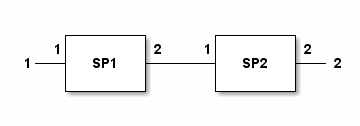
SP1 is self.
- __neg__()
Calculates an spfile object for two-port networks which is the inverse of this network. This is used to use + and - signs to cascade or deembed 2-port blocks.
- Returns:
None if number of ports is not 2.
spfile which is the inverse of the spfile object operated on.
- Return type:
- __sub__(SP2)
Implements SP1-SP2. Deembeds SP2 from port-2 of SP1. Port ordering is as follows: (1)-SP1-(2)—(1)-SP2-(2) SP1 is self.
- add_abs_noise(dbnoise=0.1, phasenoise=0.1, inplace=- 1)
This method adds random amplitude and phase noise to the s-parameter data. Mean value for both noises are 0.
- Parameters:
dbnoise (float, optional) – Standard deviation of amplitude noise in dB. Defaults to 0.1.
phasenoise (float, optional) – Standard deviation of phase noise in degrees. Defaults to 0.1.
inplace (int, optional) – object editing mode. Defaults to -1.
- Returns:
object with noisy data
- Return type:
- aliases = {'freqs': 'frequency_points'}
- calc_syz(input='S', indices=None)
This function, using one of S, Y and Z parameters, calculates the other two parameters. Y and Z-matrices calculated separately instead of calculating one and taking inverse. Because one of them may be undefined for some circuits.
- Parameters:
input (str, optional) – Input parameter type (should be S, Y or Z). Defaults to “S”.
indices (list, optional) – If given, output matrices are calculated only at the indices given by this list. If it is None, then output matrices are calculated at all frequencies. Defaults to None.
- calc_t_eigs(port1=1, port2=2)
Eigenfunctions and Eigenvector of T-Matrix is calculated. Only power-wave formulation is implemented.
- change_ref_impedance(Znewinput, inplace=- 1)
Changes reference impedance and re-calculates S-Parameters.
- Parameters:
Znew (float or list) – New Reference Impedance. Its type can be: - float: In this case Znew value is used for all ports - list: In this case each element of this list is assgined to different ports in order as reference impedance. Length of Znew should be equal to number of ports. If an element of the list is None, then the reference impedance for corresponding port is not changed.
- Returns:
The spfile object with new reference impedance
- Return type:
- change_smatrix_type(smatrix_type)
Change S-Matrix formulation and re-calculate s-parameters.
- Parameters:
smatrix_type (int) – S-Matrix type. Possible values: 1: Power-Wave, 2:Pseudo-Wave, 3: HFSS Pseudo-Wave
- check_passivity()
This method determines the frequencies and frequency indices at which the network is not passive. Reference: Fast Passivity Enforcement of S-Parameter Macromodels by Pole Perturbation.pdf For a better discussion: “S-Parameter Quality Metrics (Yuriy Shlepnev)”
- Returns:
For non-passive frequencies (indices, frequencies, eigenvalues)
- Return type:
3-tuple of lists
- column_of_data(i, j)
Gets the indice of column at sdata matrix corresponding to \(S_{i j}\) For internal use of the library.
- Parameters:
i (int) – First index
j (int) – Second index
- Returns:
Index of column
- Return type:
int
- conj_match_uncoupled(ports=None, inplace=- 1, noofiters=50)
Sets the reference impedance for given ports as the complex conjugate of output impedance at each port. The ports are assumed to be uncoupled. Coupling is taken care of by doing the same operation multiple times.
- Parameters:
ports (list,optional) – [description]. Defaults to all ports.
inplace (int, optional) – Object editing mode. Defaults to -1.
noofiters (int, optional) – Numberof iterations. Defaults to 50.
- Returns:
spfile object with new s-parameters
- connect_2_ports(k, m, inplace=- 1)
Port-m is connected to port-k and both ports are removed. Reference: QUCS technical.pdf, S-parameters in CAE programs, p.29
- Parameters:
k (int) – First port index to be connected.
m (int) – Second port index to be connected.
inplace (int, optional) – Object editing mode. Defaults to -1.
- Returns:
New spfile object
- Return type:
- connect_2_ports_list(conns, inplace=- 1)
Short circuit ports together one-to-one. Short circuited ports are removed. Ports that will be connected are given as tuples in list conns i.e. conns=[(p1,p2),(p3,p4),..] The order of remaining ports is kept. Reference: QUCS technical.pdf, S-parameters in CAE programs, p.29
- Parameters:
conns (list of tuples) – A list of 2-tuples of integers showing the ports connected
inplace (int, optional) – Object editing mode. Defaults to -1.
- Returns:
New spfile object
- Return type:
- connect_2_ports_retain(k, m, inplace=- 1)
Port-m is connected to port-k and both ports are removed. New port becomes the last port of the circuit. Reference: QUCS technical.pdf, S-parameters in CAE programs, p.29
- Parameters:
k (int) – First port index to be connected.
m (int) – Second port index to be connected.
inplace (int, optional) – Object editing mode. Defaults to -1.
- Returns:
New spfile object
- Return type:
- connect_network_1_conn(EX, k, m, preserveportnumbers=False, inplace=- 1)
Port-m of EX circuit is connected to port-k of this circuit. Both of these ports will be removed. Remaining ports of EX are added to the port list of this circuit in order. Reference: QUCS technical.pdf, S-parameters in CAE programs, p.29
- Parameters:
EX (spfile) – External network to be connected to this.
k (int) – Port number of self to be connected.
m (int) – Port number of EX to be connected.
inplace (int, optional) – Object editing mode. Defaults to -1.
preserveportnumbers (bool, optional) – if True, the number of the first added port will be k. Defaults to False.
- Returns:
Connected network
- Return type:
- connect_network_1_conn_retain(EX, k, m, inplace=- 1)
Port-m of EX circuit is connected to port-k of this circuit. This connection point will also be a port. Remaining ports of EX are added to the port list of this circuit in order. The port of connection point will be the last port of the final network. Reference: QUCS technical.pdf, S-parameters in CAE programs, p.29
- Parameters:
EX (spfile) – External network to be connected to this.
k (int) – Port number of self to be connected.
m (int) – Port number of EX to be connected.
inplace (int, optional) – Object editing mode. Defaults to -1.
preserveportnumbers1 (bool, optional) – if True, the number of the first added port will be k. Defaults to False.
- Returns:
Connected network
- Return type:
- convert_s1p_to_s2p()
- copy()
- copy_data_from_spfile(local_i, local_j, source_i, source_j, sourcespfile)
This method copies S-Parameter data from another SPFILE object
- classmethod cpwg_line(length, w, th, er, s, h, freqs=None)
Create an
spfileobject corresponding to a cpwg transmission line.- Parameters:
length (float) – Length of cpwg line.
w (float) – Width of cpwg line.
th (float) – Thickness of metal.
er (float) – Relative permittivity of substrate.
s (float) – Gap of cpwg line.
h (float) – Thickness of substrate.
freqs (float, optional) – Frequency list of object. Defaults to None. If None, frequencies should be set later.
- Returns:
An spfile object.
- Return type:
- crop_with_frequency(fstart=None, fstop=None, inplace=- 1)
Crop the points below fstart and above fstop. No recalculation or interpolation occurs.
- Parameters:
fstart (float, optional) – Lower frequency for cropping. Default value is None which means no cropping will occur at lower frequency side.
fstop (float, optional) – Higher frequency for cropping. Default value is None which means no cropping will occur at higher frequency side.
inplace (int, optional) – Object editing mode. Defaults to -1.
- Returns:
spfile object with new frequency points.
- Return type:
- data_array(data_format='DB', M='S', i=1, j=1, frequencies=None, ref=None, DCInt=0, DCValue=0.0, smoothing=0, InterpolationConstant=0)
Return a network parameter between ports i and j (\(M_{i j}\)) at specified frequencies in specified format.
- Parameters:
data_format (str, optional) – Defaults to “DB”. The format of the data returned. Possible values (case insensitive): - “K”: Stability factor of 2-port - “MU1”: Input stability factor of 2-port - “MU2”: Output stability factor of 2-port - “VSWR”: VSWR at port i - “MAG”: Magnitude of \(M_{i j}\) - “DB”: Magnitude of \(M_{i j}\) in dB - “REAL”: Real part of \(M_{i j}\) - “IMAG”: Imaginary part of \(M_{i j}\) - “PHASE”: Phase of \(M_{i j}\) in degrees between 0-360 - “UPHASE”: Unwrapped Phase of \(M_{i j}\) in degrees - “GDELAY”: Group Delay of \(M_{i j}\) in seconds
M (str, optional) – Defaults to “S”. Possible values (case insensitive): - “S”: Return S-parameter data - “Y”: Return Y-parameter data - “Z”: Return Z-parameter data - “ABCD”: Return ABCD-parameter data
i (int, optional) – First port number. Defaults to 1.
j (int, optional) – Second port number. Defaults to 1. Ignored for data_format =”VSWR”
frequencies (list, optional) – Defaults to []. List of frequencies in Hz. If an empty list is given, networks whole frequency range is used.
ref (spfile, optional) – Defaults to None. If given the data of this network is subtracted from the same data of ref object.
DCInt (int, optional) – Defaults to 0. If 1, DC point given by DCValue is used at frequency interpolation if frequencies is not [].
DCValue (complex, optional) – Defaults to 0.0. DCValue that can be used for interpolation over frequency.
smoothing (int, optional) – Defaults to 0. if this is higher than 0, it is used as the number of points for smoothing.
InterpolationConstant (int, optional) – Defaults to 0. If this is higher than 0, it is taken as the number of frequencies that will be added between 2 consecutive frequency points. By this way, number of frequencies is increased by interpolation.
- Returns:
Network data array
- Return type:
numpy.array
- extraction(measspfile)
Extract die S-Parameters using measurement data and simulated S-Parameters Port ordering in measspfile is assumed to be the same as this spfile. Remaining ports are ports of block to be extracted. See “Extracting multiport S-Parameters of chip” in technical document.
- gav(port1=1, port2=2, ZS=[], dB=True)
Available gain from port1 to port2. If dB=True, output is in dB, otherwise it is a power ratio.
\[G_{av}=\frac{P_{av,toLoad}}{P_{av,fromSource}}\]- Parameters:
port1 (int, optional) – Index of input port. Defaults to 1.
port2 (int, optional) – Index of output port. Defaults to 2.
ZS (list or numpy.ndarray, optional) – Impedance of input port. Defaults to current reference impedance.
dB (bool, optional) – Enable dB output. Defaults to True.
- Returns:
Array of Gmax values for all frequencies
- Return type:
numpy.ndarray
- get_port_number_from_name(isim)
Index of first port index with name isim
- Parameters:
isim (bool) – Name of the port
- Returns:
Port index if port is found, 0 otherwise
- Return type:
int
- gmax(port1=1, port2=2, dB=True)
Calculates Gmax from port1 to port2. Other ports are terminated with current reference impedances. If dB=True, output is in dB, otherwise it is a power ratio.
- Parameters:
port1 (int, optional) – Index of input port. Defaults to 1.
port2 (int, optional) – Index of output port. Defaults to 2.
dB (bool, optional) – set True to enable dB output. Defaults to True.
- Returns:
Array of Gmax values for all frequencies
- Return type:
numpy.ndarray
- gop(port1=1, port2=2, ZL=None, dB=True)
Operating power gain from port1 to port2 with load impedance of ZL. If dB=True, output is in dB, otherwise it is a power ratio.
\[G_{op}=\frac{P_{toLoad}}{P_{toNetwork}}\]- Parameters:
port1 (int, optional) – Index of input port. Defaults to 1.
port2 (int, optional) – Index of output port. Defaults to 2.
ZL (ndarray or float, optional) – Load impedance. Defaults to current port impedance at port2.
dB (bool, optional) – Enable dB output. Defaults to True.
- Returns:
Array of Gop values for all frequencies
- Return type:
numpy.ndarray
- gop2(port1=1, port2=2, ZL=50.0, dB=True)
Operating power gain from port1 to port2 with load impedance of ZL. If dB=True, output is in dB, otherwise it is a power ratio.
\[G_{op}=\frac{P_{toLoad}}{P_{toNetwork}}\]- Parameters:
port1 (int, optional) – Index of input port. Defaults to 1.
port2 (int, optional) – Index of output port. Defaults to 2.
ZL (ndarray or float, optional) – Load impedance. Defaults to current port impedance at port2.
dB (bool, optional) – Enable dB output. Defaults to True.
- Returns:
Array of Gop values for all frequencies
- Return type:
numpy.ndarray
- gt(port1=1, port2=2, ZS=[], ZL=[], dB=True)
This method calculates transducer gain (GT) from port1 to port2. Source and load impedances can be specified independently. If any one of them is not specified, current reference impedance is used for that port. Other ports are terminated by reference impedances. This calculation can also be done using impedance renormalization.
\[G_{av}=\frac{P_{load}}{P_{av,fromSource}}\]- Parameters:
port1 (int, optional) – Index of source port. Defaults to 1.
port2 (int, optional) – Index of load port. Defaults to 2.
dB (bool, optional) – Enable dB output. Defaults to True.
ZS (float, optional) – Source impedance. Defaults to 50.0.
ZL (float, optional) – Load impedance. Defaults to 50.0.
- Returns:
Array of GT values for all frequencies
- Return type:
numpy.ndarray
- impulse_response(i=2, j=1, dc_interp=1, dc_value=0.0, max_time_step=1.0, freq_res_coef=1.0, window_name='blackman')
Calculates impulse response of \(S_{i j}\)
- Parameters:
i (int, optional) – Port-1. Defaults to 2.
j (int, optional) – Port-2. Defaults to 1.
dc_interp (int, optional) – If 1, add DC point to interpolation. Defaults to 1.
dc_value (float, optional) – dc_value to be used at interpolation if dc_interp=0. Defaults to 0.0. This value is appended to \(S_{i j}\) and the rest is left to interpolation in data_array function.
max_time_step (float, optional) – Not used for now. Defaults to 1.0.
freq_res_coef (float, optional) – Coeeficient to increase the frequency resolution by interpolation. Defaults to 1.0 (no interpolation).
window (str, optional) – Windows function to prevent ringing. Defaults to “blackman”. Other windows will be added later.
- Returns:
- The elements of the tuple are the following in order:
Raw frequency data used as input
Window array
Time array
Time-Domain Waveform of Impulse Response
Time-Domain Waveform of Impulse Input
Time step
Frequency step
Size of input array
Max Value of Impulse Input
- Return type:
9-tuple
- impulse_response_banded(i=2, j=1, dc_interp=1, dc_value=0.0, max_time_step=1.0, freq_res_coef=1.0, Window='blackman')
Calculates impulse response of \(S_{i j}\)
- Parameters:
i (int, optional) – Port-1. Defaults to 2.
j (int, optional) – Port-2. Defaults to 1.
dc_interp (int, optional) – If 1, add DC point to interpolation. Defaults to 1.
dc_value (float, optional) – dc_value to be used at interpolation if dc_interp=0. Defaults to 0.0. This value is appended to \(S_{i j}\) and the rest is left to interpolation in data_array function.
max_time_step (float, optional) – Not used for now. Defaults to 1.0.
freq_res_coef (float, optional) – Coeeficient to increase the frequency resolution by interpolation. Defaults to 1.0 (no interpolation).
Window (str, optional) – Windows function to prevent ringing. Defaults to “blackman”. Other windows will be added later.
- Returns:
- The elements of the tuple are the following in order:
Raw frequency data used as input
Window array
Time array
Time-Domain Waveform of Impulse Response
Time-Domain Waveform of Impulse Input
Time step
Frequency step
Size of input array
Max Value of Impulse Input
- Return type:
9-tuple
- interpolate(number_of_points=5, inplace=- 1)
This method increases the number of frequencies through interpolation.
- Parameters:
number_of_points (int, optional) – Number of points used for interpolation. Defaults to 5.
inplace (int, optional) – object editing mode. Defaults to -1.
- Returns:
Network object with smooth data
- Return type:
- interpolate_data(datain, freqs)
Calculate new data corresponding to new frequency points freqs by interpolation from original data corresponding to current frequency points of the network.
- Parameters:
data (numpy.ndarray or list) – Original data specified at current frequency points of the network.
freqs (numpy.ndarray or list) – New frequency list.
- Returns:
New data corresponding to freqs
- Return type:
numpy.ndarray
- inverse_2port(inplace=- 1)
Take inverse of 2-port data for de-embedding purposes. The reference impedance of the network is not changed.
- Parameters:
inplace (int, optional) – Object editing mode. Defaults to -1.
- Returns:
Inverted 2-port spfile
- Return type:
- load_impedance(Gamma_in, port1=1, port2=2)
Calculates termination impedance at port2 that gives Gamma_in reflection coefficient at port1.
- Parameters:
Gamma_in (float,ndarray) – Required reflection coefficient.
port1 (int) – Source port.
port2 (int) – Load port.
- Returns:
Array of reflection coeeficient of termination at port2
- Return type:
numpy.ndarray
- make_symmetric(kind=1, inplace=- 1)
Make SPFILE symmetric by taking the average of S11 and S22. S12=S21 assumed.
- Parameters:
inplace (int, optional) – Object editing mode. Defaults to -1.
- Returns:
Modified spfile object
- Return type:
- classmethod microstrip_line(length, w, h, t, er, freqs=None)
Create an
spfileobject corresponding to a microstrip line.- Parameters:
length (float) – Length of microstrip line.
w (float) – Width of microstrip line.
h (float) – Thickness of substrate.
t (float) – Thickness of metal.
er (float) – Relative permittivity of microstrip substrate.
freqs (float, optional) – Frequency list of object. Defaults to None. If None, frequencies should be set later.
- Returns:
An spfile object.
- Return type:
- classmethod microstrip_step(w1, w2, eps_r, h, t, freqs=None)
Create an
spfileobject corresponding to a microstrip step.- Parameters:
w1 (float) – Width of microstrip line at port-1.
w2 (float) – Width of microstrip line at port-2.
t (float) – Thickness of metal.
freqs (float, optional) – Frequency list of object. Defaults to None. If None, frequencies should be set later.
- Returns:
An spfile object equivalent to microstrip step.
- Return type:
- port_numbers_from_names(*names)
This function returns the list of port numbers corresponding to the exact port names given as input parameters.
- Parameters:
names (str) – Port names are given as arguments in order.
- Returns:
list of port numbers in order.
- port_numbers_from_names2(*names)
This function returns the list of port numbers corresponding to the port names given as input parameters. For each port name, the port number with closest name is returned. Levenshtein distance is used.
- Parameters:
names (str) – Port names are given as arguments in order.
- Returns:
list of port numbers in order.
- port_numbers_from_names3(*names, cutoff=0.3)
This function returns the list of port numbers corresponding to the port names given as input parameters. For each port name, the port number with closest name is returned. Difflib builtin library is used. By default, a cutoff value of 0.3 is used and -1 is returned when no match is found for an input port name.
- Parameters:
names (str) – Port names are given as arguments in order.
cutoff (float, optional) – Cutoff value used at difflib library. It should be between 0.0 and 1.0. 1.0 means is perfect match.
- Returns:
list of port numbers in order.
- prepare_ref_impedance_array(imparray=None)
Turns reference impedance array which is composed of numbers,arrays, functions or 1-ports to numerical array which is composed of numbers and arrays. It is made sure that \(Re(Z) eq 0\). Mainly for internal use.
- Args:
imparray (list, optional): List of impedance array. Default is None.
- Returns:
numpy.ndarray: Calculated impedance array
- read_file(file_name, skiplines=0, only_port_number=False)
Network data is read from file. filename attribute of object is set with given argument.
- Parameters:
filename (str) – Name of the file to be read. Its extension should be either “ts” of in the form of “sNp” or “sN”.
skiplines (int, optional) – This option is used if some beginning lines will be ignored. Default value is 0.
only_port_number (bool, optional) – If True, the aim of the file reading is only to get the number of ports and the process is terminated once the port number is determined. Default is False.
- read_file_again()
Network data is read from the file named filename.
- restore_passivity(inplace=- 1)
Make the network passive by minimum modification. Reference: Fast and Optimal Algorithms for Enforcing Reciprocity, Passivity and Causality in S-parameters.pdf
- Parameters:
inplace (int, optional) – Object editing mode. Defaults to -1.
- Returns:
Passive network object
- Return type:
- restore_passivity2()
Obsolete Bu metod S-parametre datasinin pasif olmadigi frequenciesda S-parametre datasina mumkun olan en kucuk degisikligi yaparak S-parametre datasini pasif hale getirir. Referans: Restoration of Passivity In S-parameter Data of Microwave Measurements.pdf
- return_s2p(port1=1, port2=2)
Return 2-port s-parameters tuple between port1- and port-2.
- s2abcd(port1=1, port2=2)
S-Matrix to ABCD matrix conversion between 2 chosen ports. Other ports are terminated with reference impedances
- Parameters:
port1 (int, optional) – Index of Port-1. Defaults to 1.
port2 (int, optional) – Index of Port-2. Defaults to 2.
- Returns:
ABCD data. Numpy.matrix of size (ns,4) (ns: number of frequencies). Each row contains (A,B,C,D) numbers in order.
- Return type:
numpy.matrix
- s2t()
Calculate transmission matrix for 2-port networks.
- Returns:
SPFILE object
- Return type:
- scaledata(scale=1.0, dataindices=None)
Multiply all elements in S-Parameter matrices by scale.
- classmethod series_impedance(Z, freqs=None)
Create an
spfileobject corresponding to a stripline step- Parameters:
R (float) – Shunt resistance.
freqs (float, optional) – Frequency list of object. Defaults to None. If None, frequencies should be set later.
- Returns:
An spfile object.
- Return type:
- set_data_points(m, indices, x)
Set the value for some part of S-Parameter data.
\[S_{i j}[m:m+len(x)]=x\]- Parameters:
m (int) – Starting frequency indice
indices (tuple of int) – Parameters to be set (i,j)
x (number or list) – New value. If this is a number, it is converted to a list.
- set_frequencies_wo_recalc(freqs)
Directly sets the frequencies of this network, but does not re-calculate s-parameters.
- Parameters:
freqs (list or ndarray) – New frequency values
- set_frequency_limits(flow, fhigh, inplace=- 1)
Remove frequency points higher than fhigh and lower than flow.
- Parameters:
flow (float) – Lowest Frequency (Hz)
fhigh (float) – Highest Frequency (Hz)
inplace (int, optional) – Object editing mode. Defaults to -1.
- Returns:
spfile object with new frequency points.
- Return type:
- set_frequency_points(frequencies, inplace=- 1)
Set new frequency points. if S-Parameter data generator function is available, use that to calculate new s-parameter data. If not, use interpolation/extrapolation. For new frequency points, S-Parameters and reference impedances which are in the form of array are re-calculated.
- Parameters:
frequencies ((list, numpy.ndarray)) – New frequency array in Hz.
inplace (int, optional) – Object editing mode. Defaults to -1.
- Returns:
spfile object with new frequency points.
- Return type:
- set_frequency_points_array(fstart, fstop, NumberOfPoints, inplace=- 1)
Set the frequencies of the object using start-end frequencies and number of points.
- Parameters:
fstart ([type]) – Start frequency.
fstop ([type]) – End frequency.
NumberOfPoints (int) – Number of frequencies.
inplace (int, optional) – Object editing mode. Defaults to -1.
- Returns:
spfile object with new frequency points.
- Return type:
- set_port_name(name, i)
Set name of a specific port.
- Parameters:
name (str) – New name of the port
i (int) – Port number
- set_smatrix_at_frequency_point(indices, smatrix)
Set S-Matrix at frequency indices
- Parameters:
indices (list) – List of frequency indices
smatrix (numpy.matrix) – New S-Matrix value which is to be set at all indices
- set_smatrix_type(smatrix_type)
- set_sparam_gen_func(func=None)
This function is used to set the function that generates s-parameters from frequency.
- Parameters:
func (function, optional) – function to be set. Defaults to None.
- set_sparam_mod_func(func=None)
This function is used to set the function that generates s-parameters from frequency.
- Parameters:
func (function, optional) – function to be set. Defaults to None.
- set_sym_params(paramdict)
This function is used to set the values of symbolic variables of the network. This is used if the S-Matrix of the network is defined by an arithmetic expression containing symbolic variables. This property is used in conjunction with sympy library for symbolic manipulation. Arithmetic expression for S-Matrix is defined by
set_sym_smatrixfunction.- Parameters:
paramdict (dict) – This is a dictionary containing the values of symbolic variables of the network
- set_sym_smatrix(SM)
This function is used to set arithmetic expression for S-Matrix, if S-Matrix is defined using symbolic variables.
- Parameters:
SM (sympy.Matrix) – Symbolic
sympy.Matrixexpression for S-Parameter matrix
- classmethod shunt_impedance(Z, freqs=None)
Create an
spfileobject corresponding to a stripline step- Parameters:
R (float) – Shunt resistance.
freqs (float, optional) – Frequency list of object. Defaults to None. If None, frequencies should be set later.
- Returns:
An spfile object.
- Return type:
- smoothing(smoothing_length=5, inplace=- 1)
This method applies moving average smoothing to the s-parameter data
- Parameters:
smoothing_length (int, optional) – Number of points used for smoothing. Defaults to 5.
inplace (int, optional) – object editing mode. Defaults to -1.
- Returns:
Network object with smooth data
- Return type:
- snp2smp(ports, inplace=- 1)
This method changes the port numbering of the network port j of new network corresponds to ports[j] in old network.
if the length of “ports” argument is lower than number of ports, remaining ports are terminated with current reference impedances and number of ports are reduced.
- Parameters:
ports (list) – New port order
inplace (int, optional) – Object editing mode. Defaults to -1.
- Returns:
Modified spfile object
- Return type:
- sqrt_network()
Calculate the spfile, when two of which are cascaded, this spfile is obtained.
- Returns:
SPFILE object
- Return type:
- stability_factor_k(port1=1, port2=2)
Calculates k stability factor, from port1 to port2. Other ports are terminated with reference impedances.
- Parameters:
port1 (int, optional) – Index of source port. Defaults to 1.
port2 (int, optional) – Index of load port. Defaults to 2.
- Returns:
Array of stability factor for all frequencies
- Return type:
numpy.ndarray
- stability_factor_mu1(port1=1, port2=2)
Calculates \(\mu_1\) stability factor, from port1 to port2. Other ports are terminated with reference impedances.
- Parameters:
port1 (int, optional) – Index of source port. Defaults to 1.
port2 (int, optional) – Index of load port. Defaults to 2.
- Returns:
Array of stability factor for all frequencies
- Return type:
numpy.ndarray
- stability_factor_mu2(port1=1, port2=2)
Calculates \(\mu_2\) stability factor, from port1 to port2. Other ports are terminated with reference impedances.
- Parameters:
port1 (int, optional) – Index of source port. Defaults to 1.
port2 (int, optional) – Index of load port. Defaults to 2.
- Returns:
Array of stability factor for all frequencies
- Return type:
numpy.ndarray
- classmethod stripline(length, w, er, h1, h2, t, freqs=None)
Create an
spfileobject corresponding to a stripline transmission line.- Parameters:
length (float) – Length of cpwg line.
w (float) – Width of stripline.
er (float) – Relative permittivity of substrate.
h1 (float) – Thickness of substrate from bottom ground to bottom of line.
h2 (float) – Thickness of substrate from top line to top ground.
t (float) – Thickness of metal.
freqs (float, optional) – Frequency list of object. Defaults to None. If None, frequencies should be set later.
- Returns:
An spfile object.
- Return type:
- classmethod stripline_step(w1, w2, eps_r, h1, h2, t, freqs=None)
Create an
spfileobject corresponding to a stripline step- Parameters:
w1 (float) – Width of stripline line at port-1.
w2 (float) – Width of stripline line at port-2.
eps_r (float) – Relative permittivity of stripline substrate.
h (float) – Thickness of stripline substrate.
t (float) – Thickness of metal.
freqs (float, optional) – Frequency list of object. Defaults to None. If None, frequencies should be set later.
- Returns:
An spfile object.
- Return type:
- uniform_deembed(quantity, ports='all', kind='degrees', inplace=- 1)
- This function deembeds some of the ports of S-Parameters. Deembedding quantity can be:
Phase in degrees
Phase in radians
Length in meters
Delay in seconds
A positive quantity means deembedding into the circuit. The Zc of de-embedding lines is the reference impedances of each port.
- Parameters:
quantity (float or list) – Quantity to be deembedded. - If a number is given, it is used for all frequencies and ports - If a list is given, if its size is 1, its element is used for all ports. If its size is equal to number of ports, the list is used for all frequencies. If size>1, then size should be equal to the number of frequencies. If an element of list is number, it is used for all ports. If an element of the list is also a list, the elements size should be same as the number of ports.
ports (list, optional) – List of port numbers to be deembedded. If not given all ports are deembedded.
kind (string, optional) – One of the following values, “degrees”, “radians”, “length” and “delay”. Defaults to “degrees”.
inplace (int, optional) – Object editing mode. Defaults to -1.
- Returns:
De-embedded spfile
- Return type:
- write2file(filename='', parameter='S', freq_unit='', data_format='', normalized=True)
This function writes a parameter (S, Y or Z) file. If the filename given does not have the proper filename extension, it is corrected.
- Parameters:
filename (str, optional) – Filename to be written. Defaults to “”.
parameter (str, optional) – Parameter to be written (S, Y or Z). Defaults to “S”.
freq_unit (str, optional) – Frequency unit (GHz, MHz, kHz or Hz). Defaults to “Hz”.
data_format (str, optional) – Format of file DB, RI or MA. Defaults to “”.
- y_in(k, data_format='complex')
Input admittance at port k. All ports are terminated with reference impedances.
- Parameters:
port (int) – Port number for input impedance.
data_format (str, optional) – Data format of output. Alternatives are “complex”, “real”, “imag”, “mag”, “phase”, “uphase”. Default is “complex”.
- Returns:
Array of impedance values for all frequencies
- Return type:
numpy.ndarray
- z_in(k, data_format='complex')
Input impedance at port k. All ports are terminated with reference impedances.
- Parameters:
port (int) – Port number for input impedance.
data_format (str, optional) – Data format of output. Alternatives are “complex”, “real”, “imag”, “mag”, “phase”, “uphase”. Default is “complex”.
- Returns:
Array of impedance values for all frequencies
- Return type:
numpy.ndarray
- mwtoolbox.rfnetwork.thru_line_deembedding(thru_filename, line_filename, make_symmetric=True)
Extraction of transition s-parameters from THRU and LINE measurements. Transitions on both sides are assumed to be identical. For output spfile objects, port-1 is launcher side and port-2 is transmission line side. The length difference between LINE and THRU should be ideally \(\lambda/4\). The reference impedance for the 2. port of the transition should be the same as the characteristic impedance of the interconnecting line. So the reference impedances of the output spfile should be adjusted (without renormalizing s-parameters) after calling this function. The minimum frequency in the S-Parameter files should be such that the phase difference between the measurements should be smaller than 2:math:pi.
- Parameters:
thru_filename (str) – 2-Port S-Parameter filename of THRU measurement
line_filename (str) – 2-Port S-Parameter filename of LINE measurement
- Returns:
2-Element tuple of (transition spfile, complex phase vector (\(-\gamma l\)) of connecting line of LINE standard (in radian))
- Return type:
tuple(spfile, numpy.ndarray)
- mwtoolbox.rfnetwork.trl_launcher_extraction(thru_file, line_file, reflect_file, refstd=False)
Extraction of launcher s-parameters by THRU, LINE, REFLECT calibration. For both output spfile objects, port-1 is launcher side and port-2 is transmission line side. Reference: TRL algorithm to de-embed a RF test fixture.pdf (Note that the T-Matrix definiton in the reference document is different than this library.)
- Parameters:
thru_file (str) – 2-Port S-Parameter filename or spfile of THRU measurement
line_file (str) – 2-Port S-Parameter filename or spfile of LINE measurement
reflect_file (str) – 2-Port S-Parameter filename or spfile of REFLECT measurement
refstd (boolean) – True if OPEN is used as REFLECT standard and False (default) if SHORT is used
- Returns:
3-Element tuple of (left side launcher spfile, right side launcher spfile, positive phase vector of connecting line of LINE standard (in radian) )
- Return type:
- mwtoolbox.rfnetwork.untermination_method(g1, g2, g3, gL1, gL2, gL3, returnS2P=False, freqs=None)
Determination of \(S_{11}\), \(S_{22}\) and \(S_{21}=S_{12}\) for a 2-port network network using 3 reflection coefficient values at port-1 for 3 terminations at port-2. \(S_{21}\) can only be calculated with a sign ambiguity because it exists only as square in the formulae.
Port-1: Input port. Port-2: Output port where load impedances are switched.
- Parameters:
g1 (float, complex or ndarray) – Reflection coefficient at port-1 when port-2 is terminated by a load with reflection coefficient gL1
g2 (float, complex or ndarray) – Reflection coefficient at port-1 when port-2 is terminated by a load with reflection coefficient gL2
g3 (float, complex or ndarray) – Reflection coefficient at port-1 when port-2 is terminated by a load with reflection coefficient gL3
gL1 (float, complex or ndarray) – Reflection coefficient of load at port-2 that gives g1 reflection coefficient at port-1
gL2 (float, complex or ndarray) – Reflection coefficient of load at port-2 that gives g2 reflection coefficient at port-1
gL3 (float, complex or ndarray) – Reflection coefficient of load at port-2 that gives g3 reflection coefficient at port-1
returnS2P (boolean) – If True, function returns an spfile object of the 2-port network, if False, it returns 3-tuple of S-Parameter arrays. Default is False.
freqs (numpy.ndarray, list) – If returnS2P is True, this input is used as the frequency points of the returned spfile object. Default is None.
- Returns:
Either 3-Element tuple of (S11, S22, S21) or spfile object, depending on returnS2P input.
- Return type:
tuple
- mwtoolbox.rfnetwork.untermination_method_old(g1, g2, g3, gL1, gL2, gL3, returnS2P=False, freqs=None)
Determination of \(S_{11}\), \(S_{22}\) and \(S_{21}=S_{12}\) for a 2-port network network using 3 reflection coefficient values at port-1 for 3 terminations at port-2. \(S_{21}\) can only be calculated with a sign ambiguity because it exists only as square in the formulae.
Port-1: Input port. Port-2: Output port where load impedances are switched.
- Parameters:
g1 (float, complex or ndarray) – Reflection coefficient at port-1 when port-2 is terminated by a load with reflection coefficient gL1
g2 (float, complex or ndarray) – Reflection coefficient at port-1 when port-2 is terminated by a load with reflection coefficient gL2
g3 (float, complex or ndarray) – Reflection coefficient at port-1 when port-2 is terminated by a load with reflection coefficient gL3
gL1 (float, complex or ndarray) – Reflection coefficient of load at port-2 that gives g1 reflection coefficient at port-1
gL2 (float, complex or ndarray) – Reflection coefficient of load at port-2 that gives g2 reflection coefficient at port-1
gL3 (float, complex or ndarray) – Reflection coefficient of load at port-2 that gives g3 reflection coefficient at port-1
returnS2P (boolean) – If True, function returns an spfile object of the 2-port network, if False, it returns 3-tuple of S-Parameter arrays. Default is False.
freqs (numpy.ndarray, list) – If returnS2P is True, this input is used as the frequency points of the returned spfile object. Default is None.
- Returns:
Either 3-Element tuple of (S11, S22, S21) or spfile object, depending on returnS2P input.
- Return type:
tuple
- mwtoolbox.rfnetwork.write_impedance_as_s1p(filename, frequencies, Z)
- mwtoolbox.rfnetwork.write_impedance_as_table(filename, frequencies, Z)
mwtoolbox.transmission_lines module
This module involves analysis and synthesis of RF/Microwave transmission lines.
- mwtoolbox.transmission_lines.C_R_interdigital_capacitor(w, s, h, t, length, N, er, sigma, freq)
Approximate Capacitance of Interdigital Capacitor. Ref: RF and Microwave Coupled-Line Circuits
- Parameters:
w (float) – Width of fingers
s (float) – Gap between fingers
h (float) – Height of substrate
t (float) – Metal thickness
length (float) – Length of fingers
N (int) – Number of fingers
er (float) – Dielectric permittivity
sigma (float) – Electrical conductivity of metal
freq (float) – Frequency
- Returns:
Capacitance.
- Return type:
float
- mwtoolbox.transmission_lines.average_power_rating_thick_microstrip(w, h, t, er, f, tand, sigma, mu_r, rms_roughness, Kd, dT_allowed)
Ref: Average power-handling capability of microstrip lines.pdf Kd: Thermal conductivity of dielectric (W/mK) Ka: Thermal conductivity of air (W/mK) dT_allowed: Maximum allowed temperature difference between line and ground
- mwtoolbox.transmission_lines.broadside_coupled_stripline_analysis(arg, defaultunits)
Ref: RF and Microwave Coupled Line Circuits
- Parameters:
arg (list) –
First 11 arguments are inputs.
Line Width (w) ;length
Offset (wo) ;length
Metal Thickness (t) ;length
Spacing between lines (s) ;length
Ground Spacing (b);length
Dielectric Permittivity (<font size=+2>ε<sub>r</sub></font>);
Dielectric Loss Tangent ;
Metal Conductivity ; electrical conductivity
Metal Permeability ;
Roughness ;length
Frequency ; frequency
Physical Length ;length
Impedance (even) ; impedance
Impedance (odd); impedance
Electrical Length ; angle
<font size=+2>ε<sub>eff</sub></font> ;
Conductor Loss (Even Mode) ; loss per length
Conductor Loss (Odd Mode) ; loss per length
Dielectric Loss ; loss per length
Maximum Coupling ;
- mwtoolbox.transmission_lines.broadside_coupled_stripline_synthesis(arg, defaultunits)
Ref: RF and Microwave Coupled Line Circuits
- Parameters:
arg (list) –
First 11 arguments are inputs.
Line Width (w) ;length
Offset (wo) ;length
Metal Thickness (t) ;length
Spacing between lines (s) ;length
Ground Spacing (b);length
Dielectric Permittivity (<font size=+2>ε<sub>r</sub></font>);
Dielectric Loss Tangent ;
Metal Conductivity ; electrical conductivity
Metal Permeability ;
Roughness ;length
Frequency ; frequency
Physical Length ;length
Impedance (even) ; impedance
Impedance (odd); impedance
Electrical Length ; angle
<font size=+2>ε<sub>eff</sub></font> ;
Conductor Loss (Even Mode) ; loss per length
Conductor Loss (Odd Mode) ; loss per length
Dielectric Loss ; loss per length
Maximum Coupling ;
- mwtoolbox.transmission_lines.broadside_coupled_suspended_stripline_analysis(arg, defaultunits)
- Parameters:
arg (list) –
First 11 arguments are inputs.
Line Width (w) ;length
Ground Spacing (b);length
Metal Thickness (t) ;length
Spacing between lines (s) ;length
Dielectric Permittivity (<font size=+2>ε<sub>r</sub></font>);
Dielectric Loss Tangent ;
Metal Conductivity ; electrical conductivity
Metal Permeability ;
Roughness ;length
Frequency ; frequency
Physical Length ;length
Impedance (even) ; impedance
Impedance (odd); impedance
Electrical Length (Even Mode); angle
Electrical Length (Odd Mode) ; angle
<font size=+2>ε<sub>eff</sub> (even)</font> ;
<font size=+2>ε<sub>eff</sub> (odd)</font> ;
Conductor Loss (Even Mode) ; loss per length
Conductor Loss (Odd Mode) ; loss per length
Dielectric Loss (Even Mode); loss per length
Dielectric Loss (Odd Mode) ; loss per length
Maximum Coupling ;
Ref: RF and Microwave Coupled Line Circuits
- mwtoolbox.transmission_lines.broadside_coupled_suspended_stripline_analysis_view(arg, defaultunits)
- mwtoolbox.transmission_lines.broadside_offset_coupled_stripline_analysis(arg, defaultunits)
Ref: RF and Microwave Coupled Line Circuits
- Parameters:
arg (list) –
First 11 arguments are inputs.
Line Width (w) ;length
Offset (wo) ;length
Metal Thickness (t) ;length
Spacing between lines (s) ;length
Ground Spacing (b);length
Dielectric Permittivity (<font size=+2>ε<sub>r</sub></font>);
Dielectric Loss Tangent ;
Metal Conductivity ; electrical conductivity
Metal Permeability ;
Roughness ;length
Frequency ; frequency
Physical Length ;length
Impedance (even) ; impedance
Impedance (odd); impedance
Electrical Length ; angle
<font size=+2>ε<sub>eff</sub></font> ;
Conductor Loss (Even Mode) ; loss per length
Conductor Loss (Odd Mode) ; loss per length
Dielectric Loss ; loss per length
Maximum Coupling ;
- mwtoolbox.transmission_lines.broadside_offset_coupled_stripline_analysis_view(arg, defaultunits)
- mwtoolbox.transmission_lines.broadside_offset_coupled_stripline_synthesis(arg, defaultunits)
Ref: RF and Microwave Coupled Line Circuits
- Parameters:
arg (list) –
First 11 arguments are inputs.
Line Width (w) ;length
Offset (wo) ;length
Metal Thickness (t) ;length
Spacing between lines (s) ;length
Ground Spacing (b);length
Dielectric Permittivity (<font size=+2>ε<sub>r</sub></font>);
Dielectric Loss Tangent ;
Metal Conductivity ; electrical conductivity
Metal Permeability ;
Roughness ;length
Frequency ; frequency
Physical Length ;length
Impedance (even) ; impedance
Impedance (odd); impedance
Electrical Length ; angle
<font size=+2>ε<sub>eff</sub></font> ;
Conductor Loss (Even Mode) ; loss per length
Conductor Loss (Odd Mode) ; loss per length
Dielectric Loss ; loss per length
Maximum Coupling ;
- mwtoolbox.transmission_lines.coaxial_analysis_view(arg, defaultunits)
- mwtoolbox.transmission_lines.coaxial_line_analysis(arg, defaultunits)
Analysis function for coaxial transmission line. Ref: Transmssion Line Design Handbook, p47, r-inner diameter, d-outer diameter
- Parameters:
arg (list) –
First 9 arguments are inputs.
Inner Radius (r);length
Outer Radius (d);length
Dielectric Permittivity (<font size=+2>ε<sub>r</sub></font>);
Dielectric Loss Tangent ;
Metal Conductivity ; electrical conductivity
Metal Permeability ;
Roughness ;length
Frequency ; frequency
Physical Length ;length
Impedance ; impedance
Electrical Length ; angle
<font size=+2>ε<sub>eff</sub></font> ;
Conductor Loss ; loss per length
Dielectric Loss ; loss per length
Cutoff Frequency for TE11 mode ; frequency
- mwtoolbox.transmission_lines.coaxial_line_strip_center_analysis(arg, defaultunits)
Analysis function for coaxial transmission line with strip center conductor.
- Parameters:
arg (list) –
First 9 arguments are inputs.
Strip Width (w) ;length
Dielectric Permittivity (<font size=+2>ε<sub>r</sub></font>);
Outer Diameter (D);length
Dielectric Loss Tangent ;
Metal Conductivity ; electrical conductivity
Metal Permeability ;
Roughness ;length
Frequency ; frequency
Physical Length ;length
Impedance ; impedance
Electrical Length ; angle
<font size=+2>ε<sub>eff</sub></font> ;
Conductor Loss ; loss per length
Dielectric Loss ; loss per length
Ref: Transmssion Line Design Handbook, p47, r-inner diameter, d-outer diameter
- mwtoolbox.transmission_lines.coaxial_line_synthesis(arg, defaultunits)
Synthesis function for coaxial transmission line.
- Parameters:
arg (list) –
First 9 arguments are inputs.
Inner Radius (r);length
Outer Radius (d);length
Dielectric Permittivity (<font size=+2>ε<sub>r</sub></font>);
Dielectric Loss Tangent ;
Metal Conductivity ; electrical conductivity
Metal Permeability ;
Roughness ;length
Frequency ; frequency
Physical Length ;length
Impedance ; impedance
Electrical Length ; angle
<font size=+2>ε<sub>eff</sub></font> ;
Conductor Loss ; loss per length
Dielectric Loss ; loss per length
Cutoff Frequency for TE11 mode ; frequency
Ref: Transmssion Line Design Handbook, p47, r-inner diameter, d-outer diameter
- mwtoolbox.transmission_lines.coaxial_strip_center_analysis(arg, defaultunits)
Analysis function for coaxial transmission line with strip center conductor.
- Parameters:
arg (list) –
First 9 arguments are inputs.
Strip Width (w) ;length
Dielectric Permittivity (<font size=+2>ε<sub>r</sub></font>);
Outer Diameter (D);length
Dielectric Loss Tangent ;
Metal Conductivity ; electrical conductivity
Metal Permeability ;
Roughness ;length
Frequency ; frequency
Physical Length ;length
Impedance ; impedance
Electrical Length ; angle
<font size=+2>ε<sub>eff</sub></font> ;
Conductor Loss ; loss per length
Dielectric Loss ; loss per length
Ref: Transmssion Line Design Handbook, p47, r-inner diameter, d-outer diameter
- mwtoolbox.transmission_lines.coaxial_strip_center_analysis_view(arg, defaultunits)
- mwtoolbox.transmission_lines.conductor_loss_coaxial(er, r, d, f, sigma, mu)
Conductor loss of coaxial transmission line. Ref: http://www.microwaves101.com/encyclopedia/coax_exact.cfm
- Parameters:
er (float) – Relative dielectric permittivity
r (float) – Inner radius.
d (float) – Outer radius.
f (float) – Frequency.
sigma (float) – Electrical conductivity.
mu (float) – Relative magnetic permeability.
- Returns:
Conductor loss in dB/m.
- Return type:
float
- mwtoolbox.transmission_lines.conductor_loss_eccentric_coaxial(er, r, d, sh, f, sigma, mu)
Conductor loss of eccentric coaxial transmission line. Ref: Transmssion Line Design Handbook, p56, problemli? t=0 olursa ne olacak?
- Parameters:
er (float) – Relative dielectric permittivity
r (float) – Inner radius.
d (float) – Outer radius.
sh (float) – Offset of inner conductor from center.
f (float) – Frequency.
sigma (float) – Electrical conductivity.
mu (float) – Relative magnetic permeability.
- Returns:
Conductor loss in dB/m.
- Return type:
float
- mwtoolbox.transmission_lines.conductor_loss_microstrip(w, h, t, er, sigma, mu_r, rms_roughness, f)
Microstrip conductor loss as dB/m Ref: Qucs technical.pdf, “Conductor losses”, Eq. 11.80-11.83
- mwtoolbox.transmission_lines.conductor_loss_partial_coaxial(er, r, d, f)
- mwtoolbox.transmission_lines.conductor_loss_shielded_stripline(w, b, t, g, er, f, sigma, mu)
Incremental Inductance Rule
- mwtoolbox.transmission_lines.conductor_loss_stripline(w, b, t, er, f, sigma, mu)
Calculation of conductor loss of stripline with incremental inductance rule.
- Parameters:
w (float) – Width of line (in m).
b (float) – Thickness of the substrate (in m).
t (float) – Thickness of the metal trace (in m).
er (float) – Dielectric permittivity.
f (float) – Frequency (in Hz).
sigma (float) – Electrical conductivity of metal trace.
mu (float) – Magnetic permeability of metal trace.
- Returns:
Conductor loss in dB/m.
- Return type:
float
- mwtoolbox.transmission_lines.covered_grounded_coplanar_waveguide_analysis(arg, defaultunits)
Analysis function for the covered grounded coplanar waveguide transmission line. Ref: Coplanar waveguide circuits, components and systems s89
- Parameters:
arg (list) –
First 11 arguments are inputs.
Line Width (w);length
Line Spacing (s);length
Substrate Thickness (h);length
Dielectric Permittivity (<font size=+2>ε<sub>r</sub></font>);
Cover Height (b);length
Dielectric Loss Tangent ;
Metal Conductivity ; electrical conductivity
Metal Permeability ;
Roughness ;length
Frequency ; frequency
Physical Length ;length
Impedance ; impedance
Electrical Length ; angle
<font size=+2>ε<sub>eff</sub></font> ;
Conductor Loss ; loss per length
Dielectric Loss ; loss per length
- mwtoolbox.transmission_lines.covered_grounded_coplanar_waveguide_synthesis(arg, defaultunits)
Synthesis function for the covered grounded coplanar waveguide transmission line. Ref: Coplanar waveguide circuits, components and systems s89
- Parameters:
arg (list) –
First 11 arguments are inputs.
Line Width (w);length
Line Spacing (s);length
Substrate Thickness (h);length
Dielectric Permittivity (<font size=+2>ε<sub>r</sub></font>);
Cover Height (b);length
Dielectric Loss Tangent ;
Metal Conductivity ; electrical conductivity
Metal Permeability ;
Roughness ;length
Frequency ; frequency
Physical Length ;length
Impedance ; impedance
Electrical Length ; angle
<font size=+2>ε<sub>eff</sub></font> ;
Conductor Loss ; loss per length
Dielectric Loss ; loss per length
- mwtoolbox.transmission_lines.covered_suspended_microstripline_analysis(arg, defaultunits)
Analysis function for the covered suspended microstrip transmission line. Ref: Model for Shielded Suspended Substrate Microstrip Line.pdf, Level 1 Over the range 0.5<=w/hl<=10, 0.05<=h/hl<=1.5, and er<=20 the accuracy of these model equations (in reproducing the exact theoretical data) is generally better than 0.6 percent. Static Model. Does not use frequency. Does not use thickness.
- Parameters:
arg (list) –
First 12 arguments are inputs.
Line Width (w) ;length
Metal Thickness (t) ;length
Substrate Thickness (h) ;length
Upper Cavity Height (hu) ;length
Lower Cavity Height (hl) ;length
Dielectric Permittivity (<font size=+2>ε<sub>r</sub></font>);
Dielectric Loss Tangent ;
Metal Conductivity ; electrical conductivity
Metal Permeability ;
Roughness ;length
Frequency ; frequency
Physical Length ;length
Impedance ; impedance
Electrical Length ; angle
<font size=+2>ε<sub>eff</sub></font> ;
Conductor Loss ; loss per length
Dielectric Loss ; loss per length
- mwtoolbox.transmission_lines.covered_suspended_microstripline_synthesis(arg, defaultunits)
Synthesis function for the covered suspended microstrip transmission line. Ref: Transmssion Line Design Handbook, p141, a-dielectric height, b-spacing height, t-metal thickness, w-metal width Dispersion characteristics are valid for er=12.9 and frequency >20GHz
- Parameters:
arg (list) –
First 11 arguments are inputs.
Line Width (w) ;length
Metal Thickness (t) ;length
Substrate Thickness (h) ;length
Upper Cavity Heigh (hu) ;length
Lower Cavity Height (hl) ;length
Dielectric Permittivity (<font size=+2>ε<sub>r</sub></font>);
Dielectric Loss Tangent ;
Metal Conductivity ; electrical conductivity
Metal Permeability ;
Roughness ;length
Frequency ; frequency
Physical Length ;length
Impedance ; impedance
Electrical Length ; angle
<font size=+2>ε<sub>eff</sub></font> ;
Conductor Loss ; loss per length
Dielectric Loss ; loss per length
- mwtoolbox.transmission_lines.cutoff_frequency_for_TE1_mode_microstrip(er, h)
Ref: Transmssion Line Design Handbook, p99
- mwtoolbox.transmission_lines.dc_current_rating_thick_microstrip(w, h, t, er, f, tand, sigma, mu_r, rms_roughness, Kd, dT_allowed)
Ref: Average power-handling capability of microstrip lines.pdf Kd: Thermal conductivity of dielectric (W/mK) Ka: Thermal conductivity of air (W/mK) dT_allowed: Maximum allowed temperature difference between line and ground
- mwtoolbox.transmission_lines.dielectric_loss(eeff, er, f, tand)
Gives dielectric loss in dB/m. Generic for all types of inhomogeneous transmission lines. Ref: Qucs Technical s.155
- mwtoolbox.transmission_lines.eccentric_coaxial_analysis(arg, defaultunits)
Analysis function for eccentric coaxial transmission line. Ref: Transmssion Line Design Handbook, p56, r-inner diameter, d-outer diameter
- Parameters:
arg (list) –
First 10 arguments are inputs.
Dielectric Permittivity (<font size=+2>ε<sub>r</sub></font>) ;
Inner Radius (r) ;length
Outer Radius (d) ;length
Shift From Center (s) ;length
Dielectric Loss Tangent ;
Metal Conductivity ; electrical conductivity
Metal Permeability ;
Roughness ;length
Frequency ; frequency
Physical Length ;length
Impedance ; impedance
Electrical Length ; angle
<font size=+2>ε<sub>eff</sub></font> ;
Conductor Loss ; loss per length
Dielectric Loss ; loss per length
- mwtoolbox.transmission_lines.eccentric_coaxial_line_analysis(arg, defaultunits)
Analysis function for eccentric coaxial transmission line. Ref: Transmssion Line Design Handbook, p56, r-inner diameter, d-outer diameter
- Parameters:
arg (list) –
First 10 arguments are inputs.
Dielectric Permittivity (<font size=+2>ε<sub>r</sub></font>) ;
Inner Radius (r) ;length
Outer Radius (d) ;length
Shift From Center (s) ;length
Dielectric Loss Tangent ;
Metal Conductivity ; electrical conductivity
Metal Permeability ;
Roughness ;length
Frequency ; frequency
Physical Length ;length
Impedance ; impedance
Electrical Length ; angle
<font size=+2>ε<sub>eff</sub></font> ;
Conductor Loss ; loss per length
Dielectric Loss ; loss per length
- mwtoolbox.transmission_lines.edge_coupled_microstrip_analysis(arg, defaultunits)
Analysis function for the edge coupled microstrip transmission line. Ref: Transmssion Line Design Handbook, p199, with errata sheet
- Parameters:
arg (list) –
First 11 arguments are inputs.
Line Width (w) ;length
Line Gap (s) ;length
Metal Thickness (t) ;length
Substrate Thickness (h) ;length
Dielectric Permittivity (<font size=+2>ε<sub>r</sub></font>);
Dielectric Loss Tangent ;
Metal Conductivity ; electrical conductivity
Metal Permeability ;
Roughness ;length
Frequency ; frequency
Physical Length ;length
Impedance (even); impedance
Impedance (odd); impedance
Electrical Length (even) ; angle
Electrical Length (odd) ; angle
<font size=+2>ε<sub>eff</sub></font> (even);
<font size=+2>ε<sub>eff</sub></font> (odd);
Conductor Loss (even) ; loss per length
Conductor Loss (odd) ; loss per length
Dielectric Loss (even) ; loss per length
Dielectric Loss (odd) ; loss per length
Maximum Coupling ;
Matched Impedance ;
- mwtoolbox.transmission_lines.edge_coupled_microstrip_analysis_view(arg, defaultunits)
- mwtoolbox.transmission_lines.edge_coupled_microstrip_synthesis(arg, defaultunits)
Synthesis function for the edge coupled microstrip transmission line. Ref: Transmssion Line Design Handbook, p199, with errata sheet
- Parameters:
arg (list) –
First 11 arguments are inputs.
Line Width (w) ;length
Line Gap (s) ;length
Metal Thickness (t) ;length
Substrate Thickness (h) ;length
Dielectric Permittivity (<font size=+2>ε<sub>r</sub></font>);
Dielectric Loss Tangent ;
Metal Conductivity ; electrical conductivity
Metal Permeability ;
Roughness ;length
Frequency ; frequency
Physical Length ;length
Impedance (even); impedance
Impedance (odd); impedance
Electrical Length (even) ; angle
Electrical Length (odd) ; angle
<font size=+2>ε<sub>eff</sub></font> (even);
<font size=+2>ε<sub>eff</sub></font> (odd);
Conductor Loss (even) ; loss per length
Conductor Loss (odd) ; loss per length
Dielectric Loss (even) ; loss per length
Dielectric Loss (odd) ; loss per length
Maximum Coupling ;
- mwtoolbox.transmission_lines.edge_coupled_stripline_analysis(arg, defaultunits)
Ref: Transmssion Line Design Handbook, p233, with errata sheet
- Parameters:
arg (list) –
First 14 arguments are inputs.
Line Width (w) ;length
Line Spacing (s) ;length
Metal Thickness ;length
Ground Spacing (b) ;length
Dielectric Permittivity (<font size=+2>ε<sub>r</sub></font>) ;
Dielectric Loss Tangent ;
Metal Conductivity ; electrical conductivity
Metal Permeability ;
Roughness ;length
Frequency ; frequency
Physical Length ;length
Impedance (even); impedance
Impedance (odd); impedance
Electrical Length ; angle
<font size=+2>ε<sub>eff</sub></font> ;
Conductor Loss (Even Mode) ; loss per length
Conductor Loss (Odd Mode) ; loss per length
Dielectric Loss ; loss per length
Maximum Coupling ;
- mwtoolbox.transmission_lines.edge_coupled_stripline_analysis_view(arg, defaultunits)
- mwtoolbox.transmission_lines.edge_coupled_stripline_synthesis(arg, defaultunits)
Ref: Transmssion Line Design Handbook, p233, with errata sheet
- Parameters:
arg (list) –
First 14 arguments are inputs.
Line Width (w) ;length
Dielectric Permittivity (<font size=+2>ε<sub>r</sub></font>) ;
Metal Thickness ;length
Ground Spacing (b) ;length
Line Spacing (s) ;length
Dielectric Loss Tangent ;
Metal Conductivity ; electrical conductivity
Metal Permeability ;
Roughness ;length
Frequency ; frequency
Physical Length ;length
Impedance (even); impedance
Impedance (odd); impedance
Electrical Length ; angle
<font size=+2>ε<sub>eff</sub></font> ;
Conductor Loss (Even Mode) ; loss per length
Conductor Loss (Odd Mode) ; loss per length
Dielectric Loss ; loss per length
Maximum Coupling ;
- mwtoolbox.transmission_lines.electrical_length(eeff, f, len)
This function returns electrical length in radians.
- Parameters:
arg (list) –
First 3 arguments are inputs.
eeff ( effective relative permittivity ) ;
f ; frequency
length ; length
- mwtoolbox.transmission_lines.er_eff_disp_thick_covered_microstrip(w, h, h2, t, er, f)
Effective dielectric permittivity of microstrip transmission line with a metallic cover. Reference: Lumped elements for RF and Microwave circuits, p438
- Parameters:
w (float) – Line width (in m).
h (float) – Thickness of the substrate (in m).
h2 (float) – Height above the substrate up to the cover (in m).?
t (float) – Thickness of the metal (in m).
er (float) – Dielectric permittivity of the substrate.
f (float) – Frequency (in Hz).
- Returns:
Effective dielectric permittivity.
- Return type:
float
- mwtoolbox.transmission_lines.er_eff_disp_thick_microstrip(w, h, t, er, f)
Ref: Kobayashi, %0.6 accuracy, 0.1<w/h<10, 1<er<128, no frequency limit
- mwtoolbox.transmission_lines.er_eff_partial_coaxial(er, r, d)
- mwtoolbox.transmission_lines.er_eff_qs_thick_microstrip(w, h, er, t=0.0)
Ref: (Hammerstad and Jensen denenecek), Wheeler, Qucs Technical, s.150
- mwtoolbox.transmission_lines.er_eff_qs_thin_microstrip(w, h, er)
Effective dielectric permittivity of microstrip transmission line with infinitely thin metal and ignoring dispersion. Reference: Hammerstad and Jensen, 0.2% for 0.01<w/h<1000 and er<128
- Parameters:
w (float) – Line width (in m).
h (float) – Thickness of the substrate (in m).
er (float) – Dielectric permittivity of the substrate.
- Returns:
Effective dielectric permittivity.
- Return type:
float
- mwtoolbox.transmission_lines.freq_limit_for_coupling_to_surface_modes_microstrip(er, h)
Minimum frequency for surface wave modes to generate. Ref: Microwave Engineering Using Microstrip Circuits, p86
- Parameters:
er (float) – Relative Dielectric Permittivity.
h (float) – Substrate thickness.
- Returns:
Frequency.
- Return type:
float
- mwtoolbox.transmission_lines.grounded_coplanar_waveguide_analysis(arg, defaultunits)
Analysis function for the grounded coplanar waveguide transmission line. Ref: Coplanar waveguide circuits, components and systems s89
- Parameters:
arg (list) –
First 11 arguments are inputs.
Line Width (w);length
Line Spacing (s);length
Metal Thickness (th);length
Dielectric Permittivity (<font size=+2>ε<sub>r</sub></font>);
Substrate Thickness (h);length
Dielectric Loss Tangent ;
Metal Conductivity ; electrical conductivity
Metal Permeability ;
Roughness ;length
Frequency ; frequency
Physical Length ;length
Impedance ; impedance
Electrical Length ; angle
<font size=+2>ε<sub>eff</sub></font> ;
Conductor Loss ; loss per length
Dielectric Loss ; loss per length
- mwtoolbox.transmission_lines.grounded_coplanar_waveguide_synthesis(arg, defaultunits)
Synthesis function for the grounded coplanar waveguide transmission line. Ref: Coplanar waveguide circuits, components and systems s89
- Parameters:
arg (list) –
First 10 arguments are inputs.
Line Width (w);length
Line Spacing (s);length
Dielectric Permittivity (<font size=+2>ε<sub>r</sub></font>);
Substrate Thickness (h);length
Dielectric Loss Tangent ;
Metal Conductivity ; electrical conductivity
Metal Permeability ;
Roughness ;length
Frequency ; frequency
Physical Length ;length
Impedance ; impedance
Electrical Length ; angle
<font size=+2>ε<sub>eff</sub></font> ;
Conductor Loss ; loss per length
Dielectric Loss ; loss per length
- mwtoolbox.transmission_lines.grounded_cpw_analysis(arg, defaultunits)
Analysis function for the grounded coplanar waveguide transmission line. Ref: Coplanar waveguide circuits, components and systems s89
- Parameters:
arg (list) –
First 11 arguments are inputs.
Line Width (w);length
Line Spacing (s);length
Metal Thickness (th);length
Dielectric Permittivity (<font size=+2>ε<sub>r</sub></font>);
Substrate Thickness (h);length
Dielectric Loss Tangent ;
Metal Conductivity ; electrical conductivity
Metal Permeability ;
Roughness ;length
Frequency ; frequency
Physical Length ;length
Impedance ; impedance
Electrical Length ; angle
<font size=+2>ε<sub>eff</sub></font> ;
Conductor Loss ; loss per length
Dielectric Loss ; loss per length
- mwtoolbox.transmission_lines.grounded_cpw_synthesis(arg, defaultunits)
Synthesis function for the grounded coplanar waveguide transmission line. Ref: Coplanar waveguide circuits, components and systems s89
- Parameters:
arg (list) –
First 10 arguments are inputs.
Line Width (w);length
Line Spacing (s);length
Dielectric Permittivity (<font size=+2>ε<sub>r</sub></font>);
Substrate Thickness (h);length
Dielectric Loss Tangent ;
Metal Conductivity ; electrical conductivity
Metal Permeability ;
Roughness ;length
Frequency ; frequency
Physical Length ;length
Impedance ; impedance
Electrical Length ; angle
<font size=+2>ε<sub>eff</sub></font> ;
Conductor Loss ; loss per length
Dielectric Loss ; loss per length
- mwtoolbox.transmission_lines.microstrip_analysis(arg, defaultunits)
Analysis function for microstrip transmission lines.
- Parameters:
arg (list) –
First 11 arguments are inputs.
Line Width (w);length
Substrate Thickness (h);length
Metal Thickness (t);length
Dielectric Permittivity (<font size=+2>ε<sub>r</sub></font>);
Dielectric Loss Tangent ;
Dielectric Thermal Conductivity ; thermal conductivity
Metal Conductivity ; electrical conductivity
Metal Permeability ;
Roughness ;length
Frequency ; frequency
Physical Length ;length
Impedance ; impedance
Electrical Length ; angle
Max Temp Difference (<sup>o</sup>C) ;
<font size=+2>ε<sub>eff</sub></font> ;
Conductor Loss ; loss per length
Dielectric Loss ; loss per length
Skin Depth ;length
Cutoff Frequency for TE1 mode ; frequency
Transverse Resonance Frequency; frequency
Frequency Limit for Coupling to Surface Modes ; frequency
Time Delay ; time
L per unit length ;
C per unit length ;
Surface Impedance ; impedance
Average Rated Power ; power
Max DC Current ; current
- mwtoolbox.transmission_lines.microstrip_analysis_view(arg, defaultunits)
- mwtoolbox.transmission_lines.microstrip_step_in_width(w1, w2, eps_r, h, t, freq)
Reference: Transmission Line Design Handbook p. 317
- mwtoolbox.transmission_lines.microstrip_synthesis(arg, defaultunits)
Synthesis function for microstrip transmission lines.
- Parameters:
arg (list) –
First 13 arguments are inputs.
Line Width ;length
Substrate Thickness ;length
Metal Thickness ;length
Dielectric Permittivity (<font size=+2>ε<sub>r</sub></font>);
Dielectric Loss Tangent ;
Dielectric Thermal Conductivity ; thermal conductivity
Metal Conductivity ; electrical conductivity
Metal Permeability ;
Roughness ;length
Frequency ; frequency
Physical Length ;length
Impedance ; impedance
Electrical Length ; angle
Max Temp Difference (<sup>o</sup>C) ;
<font size=+2>ε<sub>eff</sub></font> ;
Conductor Loss ; loss per length
Dielectric Loss ; loss per length
Skin Depth ;length
Cutoff Frequency for TE1 mode ; frequency
Transverse Resonance Frequency; frequency
Frequency Limit for Coupling to Surface Modes ; frequency
Time Delay ; time
L per unit length ;
C per unit length ;
Surface Impedance ; impedance
Average Rated Power ; power
Max DC Current ; current
- mwtoolbox.transmission_lines.parallel_wires_analysis(arg, defaultunits)
Analysis function for parallel wires transmission line. Ref: Transmssion Line Design Handbook, p67
- Parameters:
arg (list) –
First 10 arguments are inputs.
Dielectric Permittivity (<font size=+2>ε<sub>r</sub></font>);
First Diameter (<font size=+2>d<sub>1</sub></font>) ;length
Second Diameter (<font size=+2>d<sub>2</sub></font>) ;length
Center to Center Spacing (D) ;length
Dielectric Loss Tangent ;
Metal Conductivity ; electrical conductivity
Metal Permeability ;
Roughness ;length
Frequency ; frequency
Physical Length ;length
Impedance ; impedance
Electrical Length ; angle
<font size=+2>ε<sub>eff</sub></font> ;
Conductor Loss ; loss per length
Dielectric Loss ; loss per length
- mwtoolbox.transmission_lines.physical_length(eeff, f, elec_length)
This function returns physical length in meters.
- Parameters:
arg (list) –
First 3 arguments are inputs.
eeff ( effective relative permittivity ) ;
f ; frequency
elec_length (radian); angle
- mwtoolbox.transmission_lines.rectangular_coaxial_line_analysis(arg, defaultunits)
Analysis function for rectangular coaxial transmission line. Ref: Transmssion Line Design Handbook, p60
- Parameters:
arg (list) –
First 11 arguments are inputs.
Line Width (w) ;length
Line Thickness (t) ;length
Box Width (a) ;length
Box Height (b) ;length
Dielectric Permittivity (<font size=+2>ε<sub>r</sub></font>);
Dielectric Loss Tangent ;
Metal Conductivity ; electrical conductivity
Metal Permeability ;
Roughness ;length
Frequency ; frequency
Physical Length ;length
Impedance ; impedance
Electrical Length ; angle
<font size=+2>ε<sub>eff</sub></font> ;
Conductor Loss ; loss per length
Dielectric Loss ; loss per length
- mwtoolbox.transmission_lines.rectangular_coaxial_line_synthesis(arg, defaultunits)
Synthesis function for rectangular coaxial transmission line. Ref: Transmssion Line Design Handbook, p60
- Parameters:
arg (list) –
First 11 arguments are inputs.
Line Width (w) ;length
Line Thickness (t) ;length
Box Width (a) ;length
Box Height (b) ;length
Dielectric Permittivity (<font size=+2>ε<sub>r</sub></font>);
Dielectric Loss Tangent ;
Metal Conductivity ; electrical conductivity
Metal Permeability ;
Roughness ;length
Frequency ; frequency
Physical Length ;length
Impedance ; impedance
Electrical Length ; angle
<font size=+2>ε<sub>eff</sub></font> ;
Conductor Loss ; loss per length
Dielectric Loss ; loss per length
- mwtoolbox.transmission_lines.shielded_suspended_stripline_analysis(arg, defaultunits)
Analysis function for the shielded suspended stripline transmission line. Ref: Transmssion Line Design Handbook, p141 Analysis Equations for Shielded Suspended Substrate Microstrip Line and Broadside-Coupled Stripline.pdf Valid for 1 < a/b < 2.5, 1 < er < 4, 0.1 < h/b < 0.5
- Parameters:
arg (list) –
First 11 arguments are inputs.
Line Width (w);length
Substrate Thickness (h);length
Total Height (b);length
Box Width (a);length
Dielectric Permittivity (<font size=+2>ε<sub>r</sub></font>);
Dielectric Loss Tangent ;
Metal Conductivity ; electrical conductivity
Metal Permeability ;
Roughness ;length
Frequency ; frequency
Physical Length ;length
Impedance ; impedance
Electrical Length ; angle
<font size=+2>ε<sub>eff</sub></font> ;
Conductor Loss ; loss per length
Dielectric Loss ; loss per length
- mwtoolbox.transmission_lines.shielded_suspended_stripline_synthesis(arg, defaultunits)
Synthesis function for the shielded suspended stripline transmission line. Ref: Transmssion Line Design Handbook, p141 Analysis Equations for Shielded Suspended Substrate Microstrip Line and Broadside-Coupled Stripline.pdf Valid for 1 < a/b < 2.5, 1 < er < 4, 0.1 < h/b < 0.5
- Parameters:
arg (list) –
First 11 arguments are inputs.
Line Width (w);length
Substrate Thickness (h);length
Total Height (b);length
Box Width (a);length
Dielectric Permittivity (<font size=+2>ε<sub>r</sub></font>);
Dielectric Loss Tangent ;
Metal Conductivity ; electrical conductivity
Metal Permeability ;
Roughness ;length
Frequency ; frequency
Physical Length ;length
Impedance ; impedance
Electrical Length ; angle
<font size=+2>ε<sub>eff</sub></font> ;
Conductor Loss ; loss per length
Dielectric Loss ; loss per length
- mwtoolbox.transmission_lines.skin_depth(f, sigma, mu=1.0, er=0.0)
This function returns skin depth in meters. Ref: https://en.wikipedia.org/wiki/Skin_effect
- Parameters:
arg (list) –
First 3 arguments are inputs.
f ; frequency
sigma ; conductivity
mu ; relative permeability
er ; relative permittivity
- mwtoolbox.transmission_lines.skindepth_analysis(arg, defaultunits)
- Parameters:
arg (list) –
First 3 arguments are inputs.
Metal Conductivity ; electrical conductivity
Metal Permeability ;
Frequency ; frequency
Skin Depth ;length
Surface Impedance ; impedance
- mwtoolbox.transmission_lines.square_coaxial_circular_center_analysis(arg, defaultunits)
Analysis function for square coaxial transmission line with circular center conductor. Ref: Transmssion Line Design Handbook, p47, r-inner diameter, d-outer diameter
- Parameters:
arg (list) –
First 9 arguments are inputs.
Inner Radius (r);length
Outer Size (D);length
Dielectric Permittivity (<font size=+2>ε<sub>r</sub></font>);
Dielectric Loss Tangent ;
Metal Conductivity ; electrical conductivity
Metal Permeability ;
Roughness ;length
Frequency ; frequency
Physical Length ;length
Impedance ; impedance
Electrical Length ; angle
<font size=+2>ε<sub>eff</sub></font> ;
Conductor Loss ; loss per length
Dielectric Loss ; loss per length
- mwtoolbox.transmission_lines.square_coaxial_line_circular_center_analysis(arg, defaultunits)
Analysis function for square coaxial transmission line with circular center conductor. Ref: Transmssion Line Design Handbook, p47, r-inner diameter, d-outer diameter
- Parameters:
arg (list) –
First 9 arguments are inputs.
Inner Radius (r);length
Outer Size (D);length
Dielectric Permittivity (<font size=+2>ε<sub>r</sub></font>);
Dielectric Loss Tangent ;
Metal Conductivity ; electrical conductivity
Metal Permeability ;
Roughness ;length
Frequency ; frequency
Physical Length ;length
Impedance ; impedance
Electrical Length ; angle
<font size=+2>ε<sub>eff</sub></font> ;
Conductor Loss ; loss per length
Dielectric Loss ; loss per length
- mwtoolbox.transmission_lines.square_coaxial_line_square_center_analysis(arg, defaultunits)
Analysis function for square coaxial transmission line with square inner conductor. Ref: Transmssion Line Design Handbook, p47, r-inner diameter, d-outer diameter
- Parameters:
arg (list) –
First 9 arguments are inputs.
Dielectric Permittivity (<font size=+2>ε<sub>r</sub></font>);
Inner Size (d) ;length
Outer Size (D) ;length
Dielectric Loss Tangent ;
Metal Conductivity ; electrical conductivity
Metal Permeability ;
Roughness ;length
Frequency ; frequency
Physical Length ;length
Impedance ; impedance
Electrical Length ; angle
<font size=+2>ε<sub>eff</sub></font> ;
Conductor Loss ; loss per length
Dielectric Loss ; loss per length
- mwtoolbox.transmission_lines.square_coaxial_line_square_center_synthesis(arg, defaultunits)
Synthesis function for square coaxial transmission line with square inner conductor. Ref: Transmssion Line Design Handbook, p47, r-inner diameter, d-outer diameter
- Parameters:
arg (list) –
First 9 arguments are inputs.
Dielectric Permittivity (<font size=+2>ε<sub>r</sub></font>);
Inner Size ;length
Outer Size ;length
Dielectric Loss Tangent ;
Metal Conductivity ; electrical conductivity
Metal Permeability ;
Roughness ;length
Frequency ; frequency
Physical Length ;length
Impedance ; impedance
Electrical Length ; angle
<font size=+2>ε<sub>eff</sub></font> ;
Conductor Loss ; loss per length
Dielectric Loss ; loss per length
- mwtoolbox.transmission_lines.stripline_analysis(arg, defaultunits)
Analysis function for stripline transmission lines.
- Parameters:
arg (list) –
First 10 arguments are inputs.
Line Width (w);length
Ground Separation (h);length
Metal Thickness (t);length
Dielectric Permittivity (<font size=+2>ε<sub>r</sub></font>);
Dielectric Loss Tangent ;
Metal Conductivity ; electrical conductivity
Metal Permeability ;
Roughness ;length
Frequency ; frequency
Physical Length ;length
Impedance ; impedance
Electrical Length ; angle
<font size=+2>ε<sub>eff</sub></font> ;
Conductor Loss ; loss per length
Dielectric Loss ; loss per length
- mwtoolbox.transmission_lines.stripline_analysis_view(arg, defaultunits)
- mwtoolbox.transmission_lines.stripline_step_in_width(w1, w2, eps_r, h1, h2, t, freq)
Reference: Transmission Line Design Handbook p. 350
- mwtoolbox.transmission_lines.stripline_step_in_width2(w1, w2, eps_r, h1, h2, t, freq)
Reference: Transmission Line Design Handbook p. 350 DOES NOT WORK, may be problems in units
- mwtoolbox.transmission_lines.stripline_synthesis(arg, defaultunits)
Synthesis function for stripline transmission line.
- Parameters:
arg (list) –
First 10 arguments are inputs.
Line Width ;length
Ground Separation ;length
Metal Thickness ;length
Dielectric Permittivity (<font size=+2>ε<sub>r</sub></font>);
Dielectric Loss Tangent ;
Metal Conductivity ; electrical conductivity
Metal Permeability ;
Roughness ;length
Frequency ; frequency
Physical Length ;length
Impedance ; impedance
Electrical Length ; angle
<font size=+2>ε<sub>eff</sub></font> ;
Conductor Loss ; loss per length
Dielectric Loss ; loss per length
- mwtoolbox.transmission_lines.suspended_icrostripline_analysis(arg, defaultunits)
Analysis function for the suspended microstrip transmission line. Ref: Model for Shielded Suspended Substrate Microstrip Line.pdf, Level 1 Over the range 0.5<=w/hl<=10, 0.05<=h/hl<=1.5, and er<=20 the accuracy of these model equations (in reproducing the exact theoretical data) is generally better than 0.6 percent. Static Model. Does not use frequency. Does not use thickness.
- Parameters:
arg (list) –
First 11 arguments are inputs.
Line Width (w) ;length
Metal Thickness (t) ;length
Substrate Thickness (a) ;length
Spacing Height (b) ;length
Dielectric Permittivity (<font size=+2>ε<sub>r</sub></font>);
Dielectric Loss Tangent ;
Metal Conductivity ; electrical conductivity
Metal Permeability ;
Roughness ;length
Frequency ; frequency
Physical Length ;length
Impedance ; impedance
Electrical Length ; angle
<font size=+2>ε<sub>eff</sub></font> ;
Conductor Loss ; loss per length
Dielectric Loss ; loss per length
- mwtoolbox.transmission_lines.suspended_microstrip_analysis(arg, defaultunits)
Analysis function for the suspended microstrip transmission line. Ref: Model for Shielded Suspended Substrate Microstrip Line.pdf, Level 1 Over the range 0.5<=w/hl<=10, 0.05<=h/hl<=1.5, and er<=20 the accuracy of these model equations (in reproducing the exact theoretical data) is generally better than 0.6 percent. Static Model. Does not use frequency. Does not use thickness.
- Parameters:
arg (list) –
First 11 arguments are inputs.
Line Width (w) ;length
Metal Thickness (t) ;length
Substrate Thickness (a) ;length
Spacing Height (b) ;length
Dielectric Permittivity (<font size=+2>ε<sub>r</sub></font>);
Dielectric Loss Tangent ;
Metal Conductivity ; electrical conductivity
Metal Permeability ;
Roughness ;length
Frequency ; frequency
Physical Length ;length
Impedance ; impedance
Electrical Length ; angle
<font size=+2>ε<sub>eff</sub></font> ;
Conductor Loss ; loss per length
Dielectric Loss ; loss per length
- mwtoolbox.transmission_lines.suspended_microstrip_synthesis(arg, defaultunits)
Synthesis function for the suspended microstrip transmission line. Ref: Transmssion Line Design Handbook, p141, a-dielectric height, b-spacing height, t-metal thickness, w-metal width Dispersion characteristics are valid for er=12.9 and frequency >20GHz
- Parameters:
arg (list) –
First 11 arguments are inputs.
Line Width (w) ;length
Metal Thickness (t) ;length
Substrate Thickness (a) ;length
Spacing Height (b) ;length
Dielectric Permittivity (<font size=+2>ε<sub>r</sub></font>);
Dielectric Loss Tangent ;
Metal Conductivity ; electrical conductivity
Metal Permeability ;
Roughness ;length
Frequency ; frequency
Physical Length ;length
Impedance ; impedance
Electrical Length ; angle
<font size=+2>ε<sub>eff</sub></font> ;
Conductor Loss ; loss per length
Dielectric Loss ; loss per length
- mwtoolbox.transmission_lines.suspended_microstripline_synthesis(arg, defaultunits)
Synthesis function for the suspended microstrip transmission line. Ref: Transmssion Line Design Handbook, p141, a-dielectric height, b-spacing height, t-metal thickness, w-metal width Dispersion characteristics are valid for er=12.9 and frequency >20GHz
- Parameters:
arg (list) –
First 11 arguments are inputs.
Line Width (w) ;length
Metal Thickness (t) ;length
Substrate Thickness (a) ;length
Spacing Height (b) ;length
Dielectric Permittivity (<font size=+2>ε<sub>r</sub></font>);
Dielectric Loss Tangent ;
Metal Conductivity ; electrical conductivity
Metal Permeability ;
Roughness ;length
Frequency ; frequency
Physical Length ;length
Impedance ; impedance
Electrical Length ; angle
<font size=+2>ε<sub>eff</sub></font> ;
Conductor Loss ; loss per length
Dielectric Loss ; loss per length
- mwtoolbox.transmission_lines.symmetric_shielded_stripline_analysis(arg, defaultunits)
- Problemli.
Ref: Transmssion Line Design Handbook, p136, g-yanduvarla hat arasi bosluk, b-toplam yukseklik, g<2b olmali
- Parameters:
arg (list) –
First 11 arguments are inputs.
Line Width (w) ;length
Ground Spacing (b);length
Metal Thickness (t) ;length
spacing between lateral wall and line (g) ;length
Dielectric Permittivity (<font size=+2>ε<sub>r</sub></font>);
Dielectric Loss Tangent ;
Metal Conductivity ; electrical conductivity
Metal Permeability ;
Roughness ;length
Frequency ; frequency
Physical Length ;length
Impedance ; impedance
Electrical Length ; angle
<font size=+2>ε<sub>eff</sub></font> ;
Conductor Loss ; loss per length
Dielectric Loss ; loss per length
- mwtoolbox.transmission_lines.symmetric_shielded_stripline_synthesis(arg, defaultunits)
Ref: Transmssion Line Design Handbook, p136, g-yanduvarla hat arasi bosluk, b-toplam yukseklik, g<2b olmali
- Parameters:
arg (list) –
First 11 arguments are inputs.
Line Width (w) ;length
Ground Spacing (b);length
Metal Thickness (t) ;length
spacing between lateral wall and line (g) ;length
Dielectric Permittivity (<font size=+2>ε<sub>r</sub></font>);
Dielectric Loss Tangent ;
Metal Conductivity ; electrical conductivity
Metal Permeability ;
Roughness ;length
Frequency ; frequency
Physical Length ;length
Impedance ; impedance
Electrical Length ; angle
<font size=+2>ε<sub>eff</sub></font> ;
Conductor Loss ; loss per length
Dielectric Loss ; loss per length
- mwtoolbox.transmission_lines.synthesis(fonk, _args, k, target_value, init_value, limits)
Function that is used to calculate the parameter value of a function that will give target value. There are 2 versions in this function (SciPy and NLOPT). NLOPT is added to avoid SciPy for smaller package size for packed applications.
- Parameters:
fonk (function) – function to be used at optimization.
_args (list) – function arguments of fonk.
k (int) – list of indices of variables to be calculated by optimization.
target_value (list, optional) – target value of fonk. Defaults to [].
init_value (list, optional) – initial values of variables]. Defaults to [].
limits (list, optional) – constraints on variables. Defaults to [].
- Returns:
Calculated parameter.
- Return type:
float
- mwtoolbox.transmission_lines.synthesis_bisection_1d(fonk, _args, k, target_value, init_value, limits=None)
This function calculates x such that f(x)=y. This function is added because NLOPT version in =synthesis= function does not work fast. This function works faster because it employs the fact that all the fonk functions are monotonic functions, so bisection method can be used securely.
- Parameters:
fonk (function) – function whose parameter will be calculated
_args (list) – initial parameter list of fonk
k (int) – Index (0-based) of the parameter to be calculated in parameter list of fonk.
target_value (float) – Target value to be achieved.
init_value (float) – initial value of the parameter to calculated.
limits (list) – 2-element list of limits for the parameter to be calculated
- Returns:
The parameter value of fonk which results in an output close to target_value.
- Return type:
float
- mwtoolbox.transmission_lines.transverse_resonance_frequency_microstrip(er, h, w)
Transverse resonance frequency for microstrip. Ref: Microwave Engineering Using Microstrip Circuits, p87
- Parameters:
er (float) – Relative Dielectric Permittivity.
h (float) – Substrate thickness.
w (float) – Width of trace.
- Returns:
Frequency.
- Return type:
float
- mwtoolbox.transmission_lines.width_broadside_coupled_offset_stripline(Zeven, Zodd, b, s, er)
- mwtoolbox.transmission_lines.z_broadside_coupled_offset_stripline(w, wo, b, s, er)
- mwtoolbox.transmission_lines.z_coaxial(er, r, d)
- mwtoolbox.transmission_lines.z_coaxial_strip_center(er, w, D)
- mwtoolbox.transmission_lines.z_disp_thick_covered_microstrip(w, h, h2, t, er, f)
Ref: Lumped elements for RF and Microwave circuits, p438
- mwtoolbox.transmission_lines.z_disp_thick_microstrip(w, h, t, er, f)
- mwtoolbox.transmission_lines.z_eccentric_coaxial(er, r, d, sh)
- mwtoolbox.transmission_lines.z_edge_coupled_thick_symmetric_stripline(w, b, s, er, t)
b: ground spacing w: line width s: line spacing er: permittivity t: thickness Referans: Shielded Coupled-Strip Transmission Line.pdf
- mwtoolbox.transmission_lines.z_edge_coupled_thin_symmetric_stripline(w, b, s, er)
b: ground spacing w: line width s: line spacing er: permittivity
- mwtoolbox.transmission_lines.z_eeff_broadside_coupled_suspended_stripline(w, s, b, er)
Ref: RF and Microwave Coupled-Line Circuits
- mwtoolbox.transmission_lines.z_eeff_covered_grounded_cpw(w, s, h, er, h1)
Coplanar waveguide circuits, components and systems s89
- mwtoolbox.transmission_lines.z_eeff_cpw(w, er, s, h, t)
Transmission Line Design Handbook s73
- mwtoolbox.transmission_lines.z_eeff_disp_thick_microstrip(w, h, t, er, f)
This function is for convenience only. Returns (Z,eeff) pair to be used at ABCD matrix of TL
- mwtoolbox.transmission_lines.z_eeff_edge_coupled_microstrip(w, er, t, h, s, f)
Transmssion Line Design Handbook, p199, with errata sheet
- mwtoolbox.transmission_lines.z_eeff_grounded_cpw(w, er, s, h)
Coplanar waveguide circuits, components and systems s89 Transmission Line Design Handbook s79
- mwtoolbox.transmission_lines.z_eeff_grounded_cpw_thick(w, th, er, s, h)
Coplanar waveguide circuits, components and systems s89 Transmission Line Design Handbook s79 For thickness correction Reference: “CPWG impedance formula” document
- mwtoolbox.transmission_lines.z_eeff_inverted_suspended_stripline(w, t, h, hu, hl, er, freq)
- mwtoolbox.transmission_lines.z_eeff_inverted_suspended_stripline_0(w, t, h, b, er, freq)
- mwtoolbox.transmission_lines.z_eeff_laterally_covered_grounded_cpw(w, s, h, er, h1)
Coplanar waveguide circuits, components and systems s89
- mwtoolbox.transmission_lines.z_eeff_shielded_suspended_stripline(w, h, b, a, er)
- mwtoolbox.transmission_lines.z_eeff_suspended_microstripline(w, t, h, hl, er, freq)
- mwtoolbox.transmission_lines.z_eeff_suspended_stripline_0(w, t, h, b, er, freq)
- mwtoolbox.transmission_lines.z_eeff_suspended_stripline_eski(w, t, a, b, er, freq)
- mwtoolbox.transmission_lines.z_parallel_wires(er, d1, d2, D)
- mwtoolbox.transmission_lines.z_partial_coaxial(er, r, d)
- mwtoolbox.transmission_lines.z_qs_thick_microstrip(w, h, er, t=0)
Impedance of microstrip transmission line ignoring dispersion. Reference: Hammerstad and Jensen
- Parameters:
w (float) – Line width (in m).
h (float) – Thickness of the substrate (in m).
er (float) – Dielectric permittivity of the substrate.
t (float. optional) – Thickness of metal. Default is 0.
- Returns:
Characteristic impedance.
- Return type:
float
- mwtoolbox.transmission_lines.z_qs_thin_microstrip(w, h, er)
Impedance of microstrip transmission line with infinitely thin metal and ignoring dispersion. Reference: Qucs Technical.pdf, Hammerstad and Jensen (er should be eeff in 11.5 formula ) 0.01% for w/h<1, 0.01% for w/h<1000
- Parameters:
w (float) – Line width (in m).
h (float) – Thickness of the substrate (in m).
er (float) – Dielectric permittivity of the substrate.
- Returns:
Characteristic impedance.
- Return type:
float
- mwtoolbox.transmission_lines.z_rectangular_coaxial(w, b, t, a, er)
Ref: Transmission line design handbook, p60
- mwtoolbox.transmission_lines.z_shielded_stripline(w, b, t, g, er)
Transmssion Line Design Handbook, p136, g-yanduvarla hat arasi bosluk, b-toplam yukseklik
- mwtoolbox.transmission_lines.z_square_coaxial(er, r, d)
- mwtoolbox.transmission_lines.z_square_coaxial_square_center(er, r, d)
- mwtoolbox.transmission_lines.z_thick_offset_stripline(w, eps_r, h1, h2, t)
Characteristic impedance of asymmetric stripline transmission line. Ref: Transmssion Line Design Handbook, p. 129
- Parameters:
w (float) – Line width (in m).
eps_r (float) – Dielectric permittivity of the substrate.
h1 (float) – Thickness of the substrate under the line (in m).
h2 (float) – Thickness of the substrate above the line (in m).
t (float) – Thickness of the metal (in m).
- Returns:
Characteristic impedance.
- Return type:
float
- mwtoolbox.transmission_lines.z_thick_stripline(w, b, t, er)
Characteristic impedance of symmetric stripline transmission line. Reference: Transmssion Line Design Handbook, p. 125
- Parameters:
w (float) – Line width (in m).
b (float) – Thickness of the substrate (in m).
t (float) – Thickness of the metal (in m).
er (float) – Dielectric permittivity of the substrate.
- Returns:
Characteristic impedance.
- Return type:
float
Module contents
mwtoolbox
An python library for processing of RF/Microwave networks.